Selective database ingestion
Selective database ingestion (SDI) allows you to ingest specific databases from a MySQL source instead of the entire instance. The SDI is supported only for MySQL 8.0 and higher.
Prerequisites
Before enabling the selective database ingestion, the following prerequisites must be completed :
- MySQL 8.0 or higher on the source
- Source and staging hosts meet the requirements described in Requirements for MySQL source databases and Requirements for MySQL staging and target environments.
- If enabling Aurora GTID replication: Aurora parameter group must have gtid_mode=ON,
enforce_gtid_consistency=ON,binlog_format=ROW,and binlog_retention_hours ≥ 24. The Aurora cluster must be rebooted after parameter group changes. - If enabling Standard VM replication: binary logging must be enabled on the source (
log_bin=ON), and the source must have a uniquenon-zero server-id.
Procedure
-
In the Delphix Management application, go to Manage > Datasets and click Add dSource.
-
Select the source environment and MySQL installation.
-
Set dSource Type to Selective Database Ingestion..
-
On the Selective Database List page, enter a comma-separated list of database names to ingest (e.g.,
db1,db2,db3). Names are case-sensitive and must exist on the source.Names can include hyphens and leading or embedded spaces. Names must be 64 characters or fewer. Do not enter an empty name, a name that ends with a space,
.or.., or a name that contains/,\, a period, a backtick, a comma, an ASCII control character, or a supplementary Unicode character such as an emoji. The engine rejects invalid names during validation before provisioning starts.Database names that were accepted before this change remain valid. You do not need to migrate or reconfigure existing SDI dSources.
-
Configure source connection details (
host,port,user,password). -
Configure staging connection details (
port,password). -
(Optional) Enable Replication and select the source type:
-
Aurora — uses GTID-based replication (SOURCE_AUTO_POSITION=1)
-
Standard VM — uses binlog position-based replication
-
-
(Optional) Select the Enable HashiCorp Vault-Managed Secrets option to retrieve credentials from Vault at runtime instead of storing them in configuration.
-
Vault must be configured at the engine level prior to initiating ingestion workflows. For detailed configuration steps, refer to the Password vault support page.
-
When performing selective database ingestion, if the Enable HashiCorp Vault-Managed Secrets option is selected, the following secrets (key-value pairs) must be present in Vault:
-
Staging Initialization User
-
Staging Initialization Password
-
Source Database User
-
Source Database Password
-
Replication User (required only if “Provide Different Replication User” is enabled for SDI)
-
Replication Password (required only if “Provide Different Replication User” is enabled for SDI)
-
-
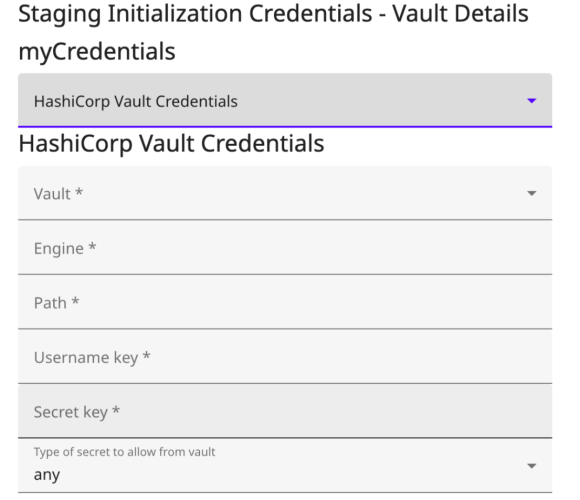
The following fields must be provided for each of the credential types—Staging Initialization Credentials, Source Database User Credentials, and Replication User Credentials (applicable only when Provide Different Replication User is enabled for SDI):
-
Vault ID
-
Engine Name
-
Path
-
Username key
-
Secret key
-
Type of secret to allow from vault(must be set to any)
-
-
-
Click Add dSource.
Database user and role export
When SDI runs, it automatically exports users, roles, and grants scoped to the selected databases from the source and imports them into staging. This preserves access control on the staging database. For managed cloud sources (RDS/Aurora) where system tables are restricted, the connector proceeds with database content only and logs a warning.