PaaS Data Automation (Preview)
Overview
The PaaS Data Automation capability allows you to orchestrate sensitive and desensitized PaaS datasets throughout your test data landscape. This solution does not leverage traditional Delphix virtualization technologies, rather, it leverages native cloud (AWS, Azure, OCI, GCP, etc) APIs and functionality. While you do not get the massive storage and speed benefits of data virtualization, it can be a great approach if:
-
Your organization struggles to automate the delivery of safe, masked data to downstream environments.
-
Your organization has a combination of on-premises and cloud workloads, and needs a complete solution to manage both.
-
Greenfield applications do not yet see the need for data virtualization, but your organization still needs a way to provide a central Self Service interface.
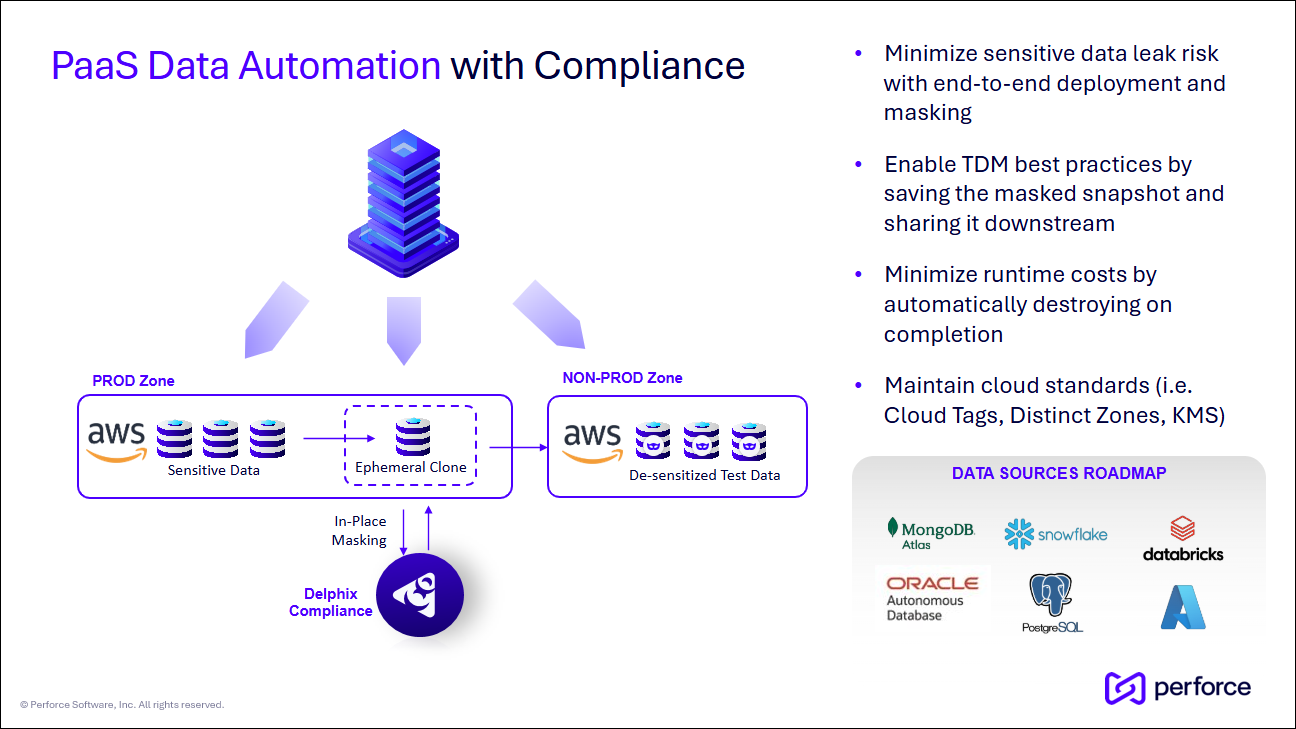
One of the primary goals of PaaS Data Automation is to align the PaaS-specific workflows with traditional Delphix operations. The table below provides a broad comparison of the two.
| Delphix operation | PaaS Database equivalent operation |
|---|---|
| Infrastructure (Environment) | PaaS instance with infrastructure discovery. |
| Link dSource |
On Infrastructure or Instance discovery, mark a PaaS dataset as a “Root Source” or Provision a downstream dataset. Note: Because traditional ingestion is not happening, the dSource creation process is not needed. |
| Provision VDB | Create a complete PaaS copy of a selected PaaS source database backup. |
| Snapshot dSource/VDB |
A) Create a new Volume Snapshot (instance) backup. B) Take DB backup and save to cloud storage. Both events are marked within a single, historical Timeline. |
| Create Bookmark | Mark a snapshot or rolling history. No backup is taken. |
| Delete dSource/VDB | Remove Source Database/VDB from DCT and (optionally) delete from the PaaS Platform. |
| User Management | RBAC based on the privileges assigned. |
| Share Snapshot/Bookmark | If sharing within the same Cloud region, modify permissions to share the associated backups. |
| Replication (coming soon) | If a different Cloud region, copy the backups. A “hollow” dataset copy will be created within DCT to mirror the replication behavior. |
Configuration and architecture
The PaaS Data Automation (Preview) feature was introduced in the 2025.6 release. All Preview features require the toggling of a feature flag. Consult the Feature previews topic for general configuration steps.
Please contact your Account Team or email the Product Management team for the feature flag and additional information.
No additional configuration is required for Appliance, Kubernetes, or OpenShift installations.
PaaS database support
-
AWS RDS Oracle (Single and Multi-Tenant Only)
-
Note: Individual database/PDB support is not yet offered. The entire Instance (including all PDBs) is managed as a single dataset.
-
-
AWS RDS PostgreSQL
-
Azure SQL Server Managed Instance (MI)
Requirements
Azure SQL Server managed instance
Connecting with Azure will require the following services to be created, enabled, and available for a given account:
-
One or more Azure SQL Server MIs (i.e., PROD and NONPROD) located in the same Availability Zone (i.e., East US)
-
Microsoft Entra ID Application
-
This will be used to authenticate with Azure and perform various lite operations. The application needs API permissions to the following objects:
-
List the Azure Managed SQL instances and databases.
-
List the Storage Account and Containers.
-
Write to the Storage Account.
-
-
-
Azure Blob Storage Account with a Container
-
This will enable backups to be stored and shared across the subscription.
-
-
Azure SQL Server MI Access
-
DCT must access the databases directly to perform operations such as provision (create), refresh (restore), and snapshot (backup).
-
One of the two access methods is required:
-
SQL Server Username and Password (Easier / Less Secure)
-
Microsoft Entra ID Authentication (Harder / More Secure)
-
-
Architecture
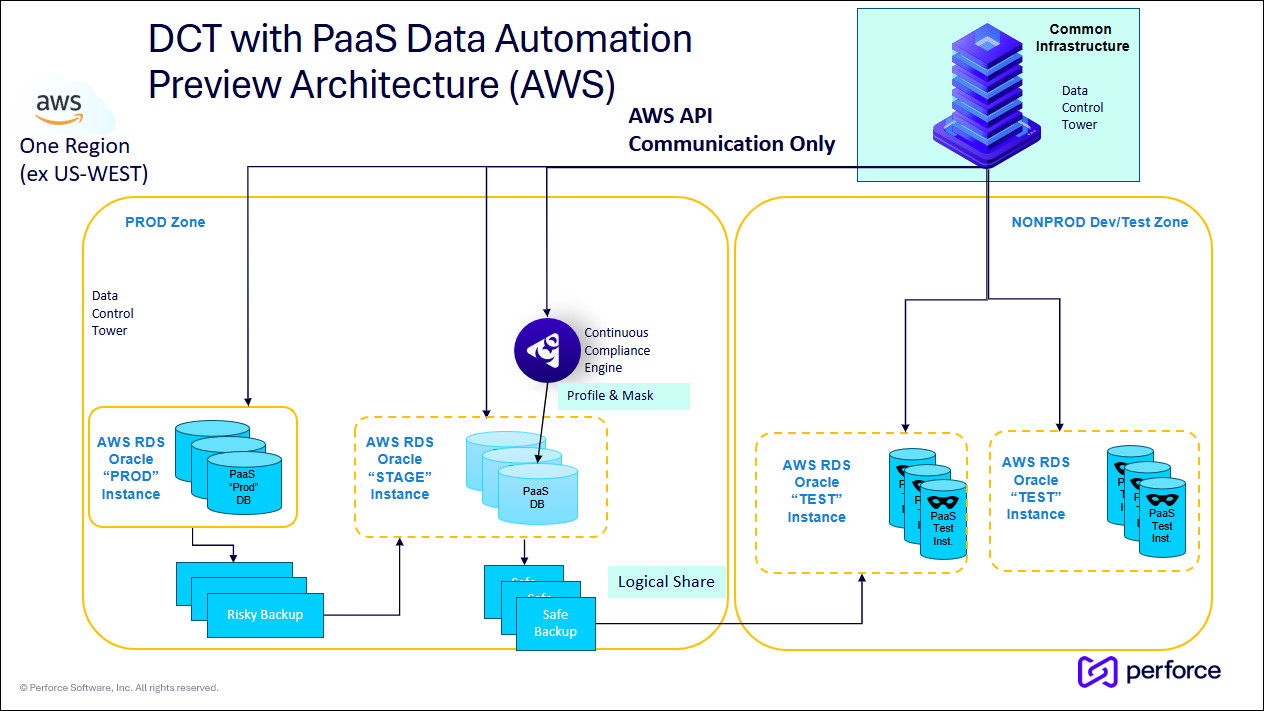
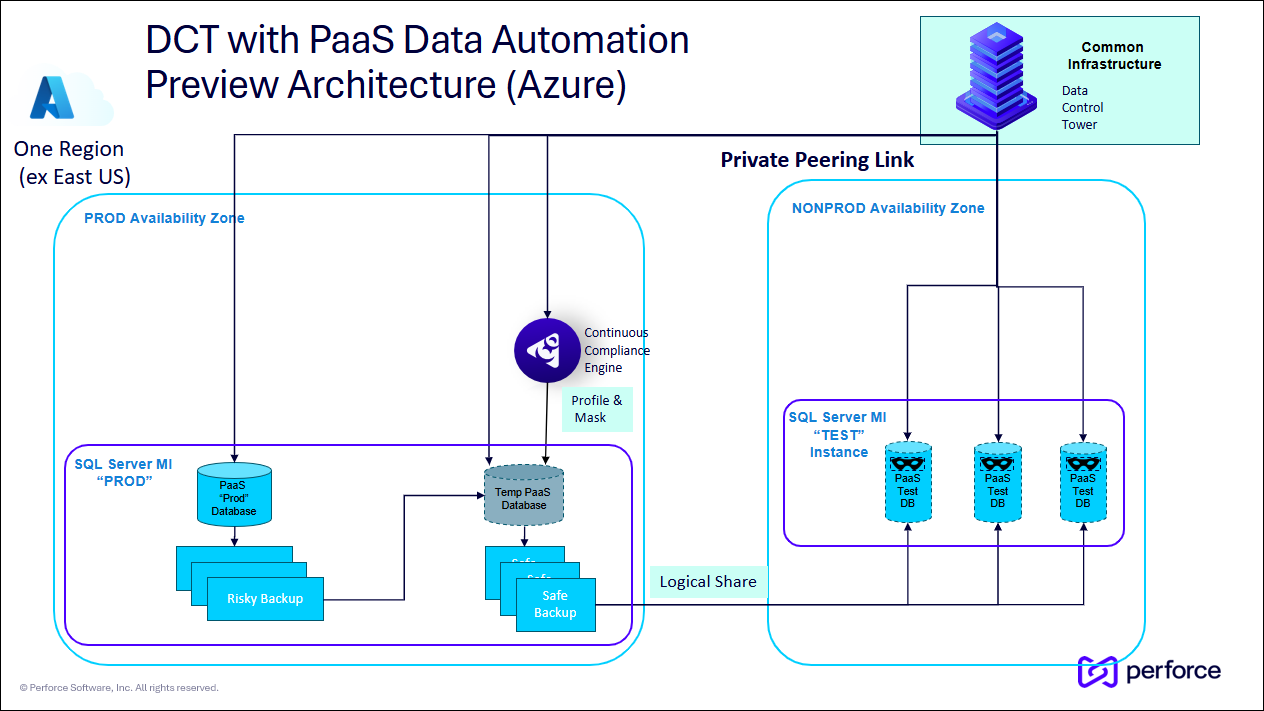
Data Control Tower communicates directly to the cloud provider using available API calls. Therefore, you must make DCT available to communicate with your cloud via HTTPS. Because DCT communicates with both production and non-production datasets, it is recommended to place DCT within a neutral zone.
Profiling and masking still occur by using a standard Continuous Compliance Engine. It is recommended that the engine be placed directly in the production zone. It will need JPBC access to your database.
See the example architectures below for AWS and Azure.
AWS RDS Databases (Oracle and PostgreSQL)
Azure SQL Server Manage Instance Databases
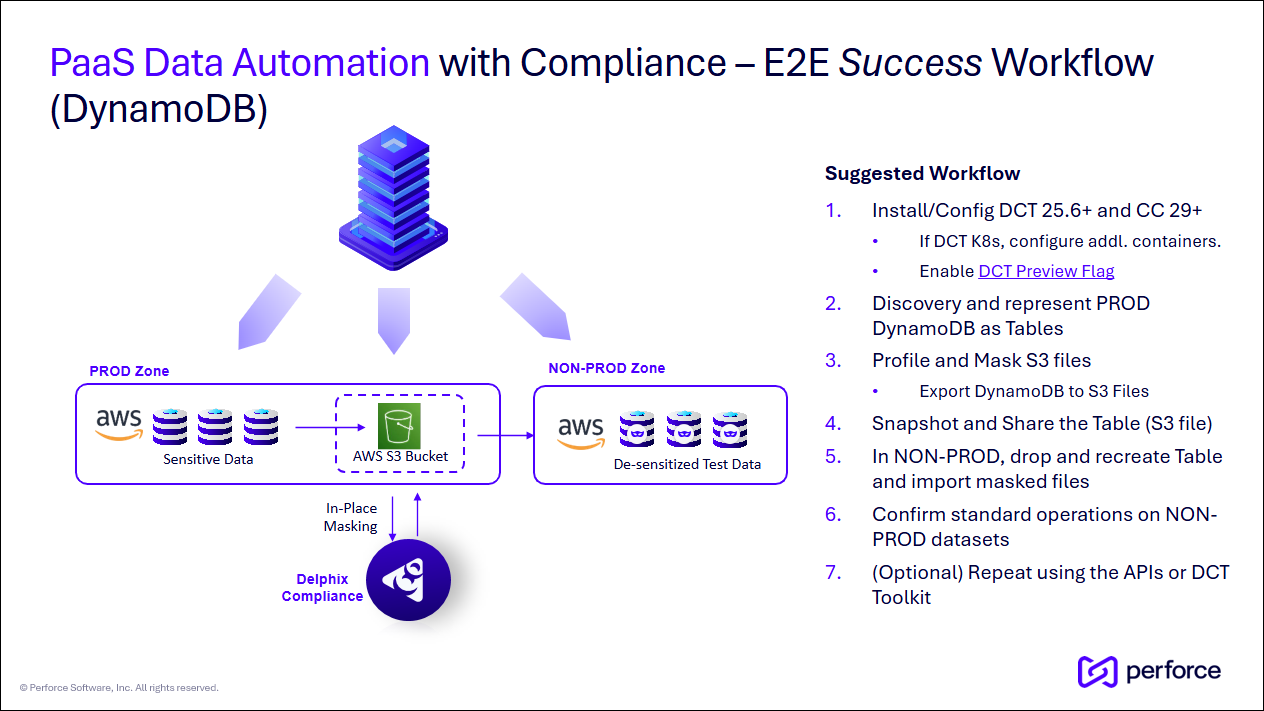
Identify, mask, and share de-sensitized data downstream
The primary goal of this solution is to assist in the movement and handling of sensitive datasets, safely share the de-sensitized datasets downstream, and ensure AppDev teams have access to the correct datasets and snapshots.
The standard profiling and masking workflows are leveraged, therefore, the PaaS Data Automation solution effectively “bookends” compliance workflows.
The workflow outlined below mirrors the standard Continuous Data and Compliance data delivery workflows.
Process steps
-
DCT should have the feature flag enabled and requires a connected Continuous Compliance.
-
Login to DCT. From Home, select Cloud Infrastructure on the left. This page is used to identify the available PaaS instances and datasets. Click + Create Cloud Infrastructure to add new ones.
-
Based on the input parameters, DCT will attempt to discover all available instances and datasets.
-
If different groups of datasets require different credentials, you can run the wizard multiple times, once for each set of credentials.
-
At this time, the Failover Admin Username and Password values would be shared across all datasets. This is preview-only behavior.
-
Identifying one "production" and one "non-production" instance is recommended.
-
-
To explore the configuration of a Cloud Infrastructure, click the View button on one from the list. This page contains an Overview and Datasets tab.
-
In the Datasets tab, select View to see the detail page of a dataset, expand the Actions menu and perform the Provision Dataset operation. Select your point-in-time or backup, any necessary configuration, and provision a “production” instance. If you do not see your instance datasets, please wait a moment. A discovery process is happening regularly in the background.
-
This new dataset will be your temporary, ephemeral, and/or working dataset, often referred to as a “Gold Copy."
-
-
Within this new temporary PaaS dataset, expand the Actions menu and select Compliance Connector. Specify the configuration details and where you will run your masking jobs.
-
Navigate to the Continuous Compliance Engine UI to perform the profiling and masking configuration. Run Profiling, but do not mask.
-
Now go back to the temporary PaaS dataset, expand the Actions menu and select Execute Compliance Job. This will kick off the created masking job.
-
On completion, create a snapshot and mark the Snapshot Visibility as true. This will allow it to be shared with other instances within the same Region.
-
In the temporary PaaS dataset, expand Actions again and Deprovision Dataset against it to reclaim unused resources.
-
You will notice the entire history of this dataset is preserved. It can easily be re-provisioned with a single button click.
-
-
Lastly, take the newly created dataset snapshot and provision a downstream AppDev in your “non-production” instance.
At this point, you can leverage the standard DCT Access Control model to control who has access to which datasets and snapshots. Downstream users should have a similar experience when they perform traditional Self Service actions against virtualized datasets, like refreshing, bookmarking, and locking.
Feedback
If you encounter issues or have feedback about a capability under a feature flag, email us at delphix-early-adopters@perforce.com. Feedback during the preview stage helps guide future development and general availability.
Delphix Support does not support feature flag capabilities.