Getting started
Data Control Tower (DCT) represents a Delphix-wide control plane by simultaneously powering data governance, automation, and compliance workflows to enable efficient operation of an all-encompassing Delphix deployment at scale.
DCT leverages container technology to deliver scalability, service-level performance tuning, and robust resiliency. As such, DCT can be deployed using a Kubernetes or OpenShift container. In addition, it can also be deployed as a virtual appliance (via OVA image).
Deployment methods
DCT can be deployed on any Certified Kubernetes platform that supports Helm, as long as the service runs a minimum of Kubernetes 1.25 or above. This includes Amazon Elastic Kubernetes Service (Amazon EKS), Azure Kubernetes Service (AKS), and beyond.
DCT can be deployed on any models of OpenShift, as long as the service runs a minimum version of 4.12 or above. This includes Red Hat OpenShift on IBM Cloud and any other cloud provider’s service. Uses a CRI-compliant container runtime, typically CRI-O.
DCT can be deployed as a virtual appliance (via hypervisor) with a downloadable OVA image from downloads.delphix.com.
Deployment architecture
DCT environments can be deployed per business unit (organizational silos), per network (datacenter-specific DCT), or globally (the most common option). A single, global DCT environment for all Delphix connected infrastructure is recommended in order to foster a centralized control plane and data management solution.
DCT-based communication is lightweight, requiring simple commands or a small telemetry payload to facilitate most workflows, as demonstrated in the image below. DCT logs into the Delphix connected infrastructure in the same way a user would, then leverages API calls to the engine to perform commands or extract metadata.
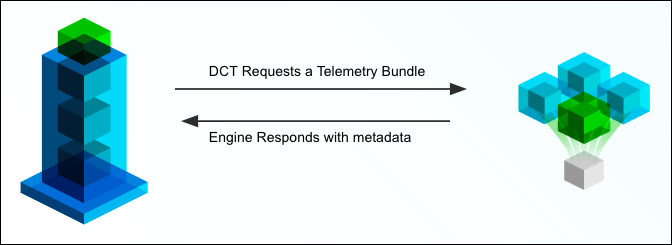
HTTP/HTTPS is required in order for DCT to facilitate communication with engines. Specifically, ports 80/443 are required to reach engines in other networks.
DCT does not directly interface with business-critical databases and will only communicate with engines to perform operations or inquire about system statuses. Instead, the Delphix connected infrastructure being referenced (generally co-located with your data) does all the heavy lifting.
Access Control
DCT implements a model found in other types of software called Attribute Based Access Control (ABAC). This model is incredibly flexible, but requires detailed configurations to perfect your use cases. In DCT’s model, there are four entity types (defined below). Familiarize with each entity, as they are the foundational blocks of DCT’s ABAC model.
| Entity | Description | Managed by |
|---|---|---|
|
Accounts |
A single or shared user who can authenticate with DCT (UI or API). |
Create manually or via Identity Provider (IdP), such as SSO or LDAP. Accounts are independent of Delphix Engines. |
|
Access Groups |
A collection of accounts that share one or more characteristics, such as a Team or Permission set. Equivalent to an Active Directory group. |
Manually created. Populated manually or via the |
|
Roles and Permissions |
The collection of read, write, and delete permissions forms a reusable, named role. |
Some roles are provided out of the box, but Admins can build their own from the available permissions. Individual permissions are immutable. |
|
Objects |
Units, such as VDBs, Bookmarks, and Environments, that are managed across the Delphix Platform. |
Automatically identified by DCT from the connected engines. Assigned to Roles via various models. The CD and CC Engines supply these objects. |
Each entity is linked to another through manual or automated assignment. A manual (or direct) assignment is a good approach for early implementations, however, that can be challenging to maintain as teams grow. As an alternative, tagging is recommended to perform automatic assignments based on your custom configuration. The below diagram shows how each entity is linked together. The directions below start with Accounts creation to Access Groups with Role assignments, and finish with Object mappings.
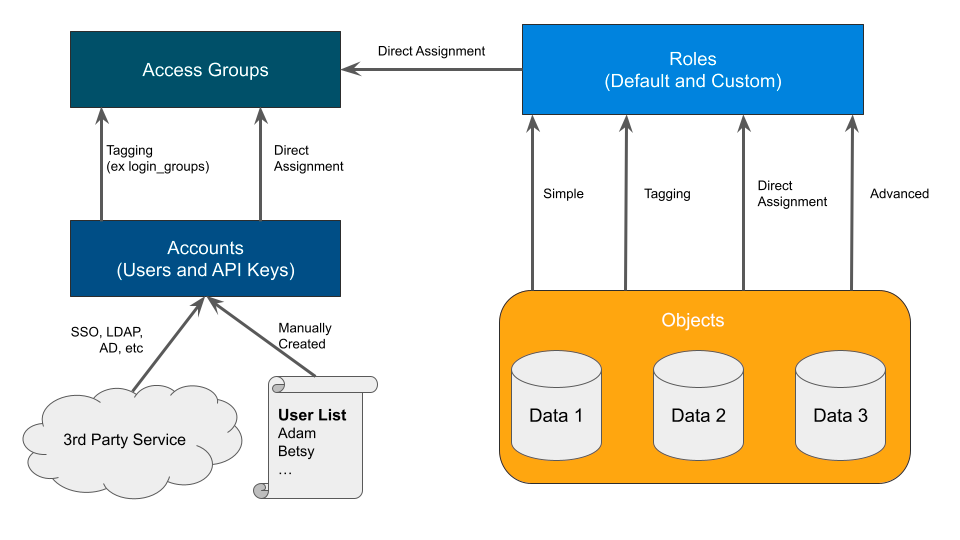
Understanding your team structure is imperative to identify the best access model. Usually, organizations have existing groupings defined in their Identify Provider (IdP). These groups are typically organized in one of two ways:
-
A team dedicated towards a central goal (such as a Product Development team).
-
A group of individuals with similar permissions (such as Security Administrators).
Understanding the purpose of each group should be a guide in how you design the roles and permissions of DCT. For example, the "Alpha" product development team might have full permission to manage existing VDBs and create new bookmarks for their team’s “Alpha” objects. Meanwhile, the security admins team might have read and disable access across the entire platform to ensure compliance. Iterating through each Access Group and designing custom, but re-useable roles, based on the Principle of Least Privilege, will lend to a streamlined deployment.
You can learn more in the Access Control section of the DCT documentation.