Concepts
Data Control Tower (DCT) introduces unique, novel approaches for Delphix workflows that streamline automation and improve the developer experience. The sections below describe these concepts in more detail.
General DCT concepts
Virtual Database (VDB) groups
Virtual Database (VDB) groups are a new concept to Delphix, which enable the association of one or more VDBs as a single VDB group. This allows for bulk operations to be performed on the grouped VDBs, such as bookmark, provision, refresh, rewind, and others. This will assist in complex application testing scenarios (e.g. integration and functional testing) that require multiple data sources to properly complete testing.
With VDB groups, developers can now maintain data synchronicity between all grouped VDBs, which is particularly useful for complex timeflow operations. For example, updating VDBs to reflect a series of schema changes across data sources, or to reflect an interesting event in all grouped datasets. In order to maintain synchronicity among grouped datasets, timeflow operations (refresh, rewind, etc.) must use a bookmark reference.
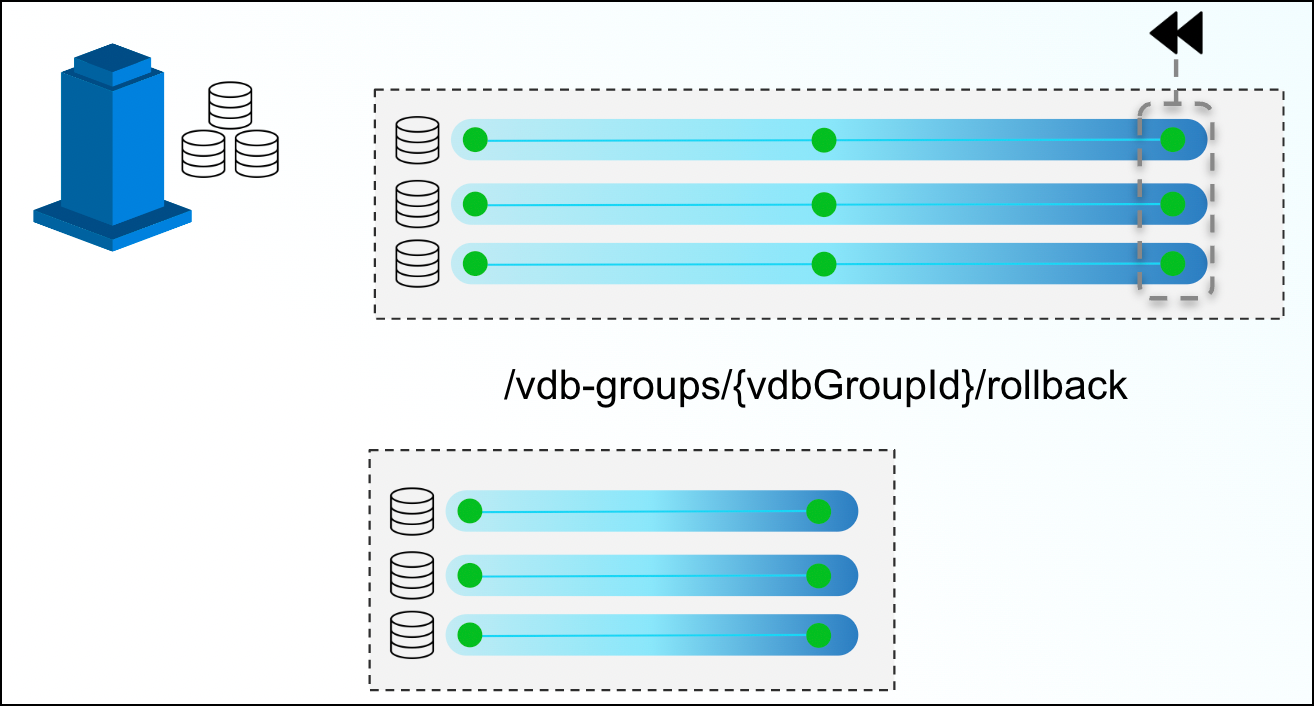
In the above example, a VDB Group reference is created for three VDBs. At the end of the above timeline group, a developer decides to rollback those VDBs to a previous snapshot. By issuing a single command via the VDB groups endpoint, DCT will move all three back, ensuring that they all maintain referential synchronicity.
Bookmarks and VDB groups are loosely related; a VDB group can exist in the absence of any bookmarks, and a bookmark can exist without any VDB group. It is important to note that the bookmark represents data, while the VDB group represents the databases to make this data available.
DCT will automatically stop an operation from executing if one or more objects are incompatible (e.g. provisioning a VDB group into a set of environments, where one of the VDBs is incompatible, such as an Oracle on Linux VDB provisioned onto a Windows environment).
VDB groups based operations will return a single job to monitor the overall status of the series of individual VDB operations. If one of those individual operations is unable to complete, DCT will report a “fail”, but any individual operations that are able to successfully complete will still do so.
Comparing Self-Service containers to VDB groups
As mentioned above, VDB groups are a crucial DCT concept that enable Self-Service functionality outside of the Self-Service application. Consider VDB groups acting similarly to Self-Service containers, in that it provides grouping and synchronization among VDBs, but VDB groups can provide a more flexible approach for users. Here are some additional points for example:
-
The same VDB can be included in multiple VDB groups
-
Including a VDB in a VDB group does not prevent operations on the VDB individually
-
VDBs can be added to or removed from VDB groups
-
VDB groups do not have their own timeline
Bookmarks
DCT Bookmarks are a new concept that represents a human-readable snapshot reference that is maintained within DCT. This is not to be confused with Self-Service bookmarks, maintained separately within the Self-Service application. With DCT Bookmarks, developers can now reference meaningful data (e.g. capturing a schema version reference to pair with an associated code version, capturing test failure data so that developers can reproduce the error in a developer environment, etc.) and use those references for any number of use-cases (e.g. versioning data as code, quickly provisioning a break/fix environment with relevant data, etc.). DCT Bookmarks are compatible with both VDBs and VDB groups, and can be used as a reference for common timeflow operations such as:
-
Provisioning a VDB or VDB group from a bookmark
-
Refreshing a VDB or VDB group to a bookmark
-
Rewinding a VDB or VDB group to a bookmark
DCT Bookmarks have associated retention policies, the default value is 30 days, but policies can be customized anywhere from a day to an infinite amount of time. Once the Bookmark expires, DCT will delete the bookmark.
Bookmarks are compatible with individual VDBs and VDB groups. Bookmark Sharing is only available for engines on version 6.0.13 and above.
DCT Bookmarks, when created, initiate a snapshot operation on each and every VDB in order to maintain synchronicity between each VDB. In that same vein, bookmark-based VDB group operations will have each VDB-specific sub-process run in parallel (as opposed to sequentially) to reduce drift between grouped VDBs.
Jobs
Jobs in DCT are the primary means of providing operation feedback (PENDING, STARTED, TIMEDOUT, RUNNING, CANCELED, FAILED, SUSPENDED, WAITING, COMPLETED, ABANDONED) for top-level operations that are run on DCT. Top-level operations represent the parent operation that may have one or more child-based jobs (e.g. refreshing a VDB group is the parent job to all of the individual refresh jobs for the grouped VDBs under the VDB group reference).
Top-level jobs will report a “FAILED” status if one or more child jobs fail. For child jobs that can complete, DCT will continue to complete those jobs even if a parent job reports a failure.
Tags
DCT Tags enable a new business metadata layer for users and consumers to filter, sort, and identify common Delphix objects, to power any number of business-driven workflows. A tag is comprised of a (Key:Value) pair that associates business-level data (e.g. location, application, owner, etc.) with supported objects. DCT 2.0 and above support the following Tags:
-
Continuous Data Engines
-
Environments
-
dSources
-
VDBs
Developers and administrators add and remove tags using tag-specific object endpoints (e.g. /vdbs/{vdbId}/tags) and can leverage tags as search criteria when using the object-specific search endpoints (e.g. using filtering language to narrow results).
Some sample tag-based use-cases include:
-
Refreshing all the VDBs owned by a specific App Team using an “Application: Payment Processing” tag. This would be accomplished by querying “what VDBs have the (Application: Payment Processing) tag" and feeding those VDB IDs into the refresh endpoint.
-
Driving accountability for VDB ownership by tagging primary and secondary owners for each VDB (e.g. (primary_owner: John Smith), (secondary_owner: Jane Brown)). That way, if a VDB is overdue for a refresh, tracking down an owner is a simple tag query.
Tags are registered as an attribute that is specific to an object as opposed to a central tagging service. As a result, tag-based querying can only be done on a per-object type basis.
A supported object can contain any number of tags.
Tag-based filtering
All taggable objects support tag-based filtering for API queries that adhere to the search standards documented in the API references. A few examples of how tag-based filtering can be used are as follows:
List all VDBs of type 'Oracle', of which IP address contains the '10.1.100' string and which have been tagged with the 'team' tag, 'app-dev-1.
database_type EQ 'Oracle' AND ip_address CONTAINS '10.1.100' and tags CONTAINS { key EQ 'team' AND value EQ 'app-dev-1'}Stateful APIs
All applicable DCT APIs are stateful so that running complex queries against a large Delphix deployment can be done rapidly and efficiently. DCT accomplishes this by periodically gathering and hosting telemetry-based Delphix metadata from each engine.
Local data availability
DCT currently relies on existing Continuous Data and Compliance constructs around data-environment-engine relationships. This means that DCT operations require VDBs to live on the engine where the parent dSource lives and so on.
Engine-to-DCT API mapping
Wherever possible, DCT has looked to provide an easier-to-consume developer experience. This means that in some cases, an API on DCT could have an identical API on an engine. However, there are many instances of providing a higher level abstraction for ease of consumption; one example is the data inventory APIs on DCT (sources, dSources, VDBs), which are a simplified representation of data represented by the source, sourceconfig, and repository endpoints on the local engine (source, dSource, and VDB detail are all combined under those three endpoints).
Local references to global UUIDs
In order to avoid collision of identically-named and referenced objects, DCT generates Universally Unique IDentifiers (UUID) for all objects. For existing objects on engines like dSources and VDBs, DCT will concatenate the local engine reference with the engine UUID (e.g. 'Oracle-1' on engine '3cec810a-ee0f-11ec-8ea0-0242ac120002' will be represented as 'Oracle-1-3cec810a-ee0f-11ec-8ea0-0242ac120002' on DCT).
Environment representations
Environments within Delphix serve as a reference for the combination of a host and instance. This is coupled with the fact that environments can be leveraged by multiple engines at the same time and that engines often have a specific context to some of the elements that comprise an environment. For example, an environment could have both an Oracle and ASE instance installed and that Engine A leverages an Oracle-based workflow and Engine B leverages an ASE workflow. DCT will create two identifiers to represent the specific host and instance combinations. Thus, in DCT, Engine A will be connected to a different uniquely identified Environment than Engine B.
As mentioned earlier with Engine-to-DCT API mapping, DCT aims to simplify the user experience with Delphix APIs by combining different Continuous Data endpoints into a simplified DCT API. The Environment API does this by combining environment, repository, and host endpoints so that writing queries against Delphix data is a much simpler process. One example would be identifying all environments that have a compatible Oracle home for provisioning:
repositories CONTAINS { database_type EQ 'Oracle' and allow_provisioning EQ true AND version CONTAINS '19.2.3'}Supported data sources/configurations
DCT is compatible with all Delphix-supported data sources and configurations.
Process feedback
Whenever a DCT request completes, it will return a JOB ID as its response. This Job ID can be used in conjunction with the jobs endpoint to query the operation status.
Continuous Data for PaaS (CD4P) concepts
This topic introduces the key concepts unique to Continuous Data for PaaS (CD4P). These concepts are analogous to traditional Continuous Data objects — such as dSources, VDBs, and Infrastructure — but operate against cloud-native PaaS databases rather than virtualized infrastructure.
Familiarity with standard DCT concepts (VDBs, dSources, bookmarks, and RBAC) is recommended before reading this page. See DCT concepts as a foundational reference.
Cloud Accounts
A Cloud Account is the top-level configuration object for CD4P. It represents a set of cloud provider credentials and a target region that DCT uses to discover and manage PaaS resources.
When a Cloud Account is created, DCT automatically runs a discovery process to find all PaaS Instances and PaaS DBs accessible with the provided credentials in the specified region. Discovery occurs in the background and recreates an operational timeline from existing backup and snapshot history.
Key properties of a Cloud Account:
-
Scoped to a single cloud provider and region (e.g., AWS RDS in us-east-1, or Azure SQL Managed Instance in East US)
-
The set of supported cloud providers is determined by the available PaaS Data Connectors installed in DCT
-
Multiple Cloud Accounts can be created within the same DCT instance — for example, one for a production account and one for a non-production account
-
All resources discovered or managed within a Cloud Account must be in the same region — cross-region operations are not supported
PaaS Instances
A PaaS Instance represents a cloud database server or container as seen by the cloud provider. The scope and behavior of a PaaS Instance varies depending on the provider. The following examples illustrate how PaaS Instances work for currently supported connectors:
-
AWS RDS (example): A PaaS Instance corresponds to an entire RDS database instance. DCT manages and operates at the instance level. For Oracle RDS, all PDBs within the instance are managed together as a single unit.
-
Azure SQL Managed Instance (example): A PaaS Instance corresponds to a SQL Managed Instance (the server container). Individual databases within the instance are managed as separate PaaS DBs. Timeline and bookmark operations are managed at the PaaS DB level.
The exact scope and capabilities of a PaaS Instance depend on the PaaS Data Connector in use. Refer to the connector-specific documentation for details.
PaaS Instances appear in the Cloud Account detail view and in the Home > Instances > PaaS tab. From a PaaS Instance details page, users can view the instance overview, timeline (where supported by the connector), bookmarks (where supported), associated PaaS DBs, and perform instance-level operations.
PaaS Instances share the same state model as PaaS DBs. See PaaS DBs below for state descriptions.
PaaS DBs
A PaaS DB is an individual database within a PaaS Instance that DCT has either discovered or provisioned. PaaS DBs are the primary operational objects in CD4P — most day-to-day workflows (provision, refresh, bookmark, deprovision) are performed at this level.
PaaS DBs and PaaS Instances share the same three-state model:
| State | Description |
|---|---|
| Discovered | Identified by DCT during cloud account discovery but not yet DCT-managed. Similar to a source config in traditional Continuous Data. |
| Root Source | A PaaS DB or Instance that DCT treats as the production source. DCT tracks lineage from this object — downstream copies are provisioned from it. A database automatically becomes a Root Source when it is first provisioned from. Root Sources are immutable; DCT does not allow self-service operations directly against them. |
| DCT Managed | A database provisioned via DCT. Fully mutable. Supports all self-service operations including refresh, bookmark, deprovision, and reprovision. |
A PaaS DB or Instance cannot be manually promoted to Root Source in the current release. Root Source designation occurs automatically when a database is first provisioned from.
Automated backup timeline
Unlike traditional Delphix dSources — which ingest data from a source database — CD4P reconstructs a timeline from the cloud provider's existing automated backup history. No data is ingested or copied into Delphix storage. The timeline displays:
-
Automated backups: Periodic backups taken by the cloud provider as part of their managed backup service
-
Rolling backup window: The continuous point-in-time recovery window maintained by the provider
-
Snapshots: Point-in-time captures initiated by DCT operations
-
Bookmarks: Named, curated references to specific points in time, created by users
The specific backup schedule, granularity, and retention period depend on the cloud provider. The following table shows examples for currently supported connectors:
| Provider (example) | Backup mechanism |
|---|---|
| AWS RDS | Daily storage volume snapshots plus continuous transaction log uploads approximately every 5 minutes. Point-in-time restore granularity: any second within the retention window. Retention: configurable 1–35 days (default 7 days via console). |
| Azure SQL Managed Instance | Full weekly backups, differential backups every 12–24 hours, transaction log backups approximately every 10 minutes. Point-in-time restore granularity: any point within the retention window. Retention: configurable up to 35 days. |
Timeline history is preserved when a PaaS DB is deprovisioned. All snapshots, bookmarks, and the automated backup window remain visible and accessible for reprovisioning.
Bookmarks
Bookmarks in CD4P function identically to DCT bookmarks on VDBs. A bookmark is a named, human-readable reference to a specific point-in-time — typically used to mark a validated, masked dataset ready for downstream sharing.
Bookmarks differ from snapshots in intent and behavior:
| Bookmark | Snapshot |
|---|---|
| Named by the user with a meaningful label | System-generated identifier |
| Can be marked Public (visible to other accounts within the same region) or Private | Private by default |
| Has configurable retention duration | Governed by the cloud provider's automated backup retention policy |
| Represents a trusted, curated, validated point — typically post-masking | Represents a point-in-time capture, not necessarily validated |
| Appears in the Bookmarks tab and is shared across instances via the sharing workflow | Appears in the Timeline tab |
Comparison with traditional Continuous Data
The following table maps traditional Delphix Continuous Data operations to their CD4P equivalents:
| Traditional Continuous Data | Continuous Data PaaS equivalent |
|---|---|
| Infrastructure (Environment) | Cloud Account + PaaS Instance |
| Link dSource | Provision a downstream copy from a discovered PaaS DB — the source automatically becomes a Root Source |
| Provision VDB | Provision a PaaS DB from a source backup or bookmark |
| Snapshot dSource/VDB | Take a backup or snapshot via DCT (stored in cloud provider storage) |
| Create Bookmark | Create a Bookmark — marks a specific point without taking a new backup |
| Refresh VDB | Refresh PaaS DB — restores to a selected point-in-time from parent, self, or shared bookmark |
| Stop/Start VDB | Stop/Start PaaS DB — pauses database activity; compute resources remain allocated |
| Disable VDB | Deprovision PaaS DB — stops the database and deletes the compute resource entirely; timeline is preserved in DCT |
| No direct VDB equivalent | Reprovision PaaS DB — re-creates the compute resource from any point on the preserved timeline. Note: VDB Disable removes a mount path but the underlying host environment continues running; Deprovision goes further by fully releasing cloud compute. |
| Delete VDB | Delete PaaS DB — removes from DCT and optionally from the cloud provider |
| RBAC / Access Groups | Same RBAC model applies — tag-based access control for all PaaS objects |