NFS server installation
The Hyperscale Compliance engine requires a Staging Area to read from the source file(s) and write to the target file(s). The Staging Area must be an NFS-shared filesystem accessible to the Hyperscale Compliance engine and the Continuous Compliance Engines. The following are the supported ways by which the filesystem can be shared over NFS(NFSv3/NFSv4):
Delphix Continuous Data Engine empty VDB
To create a Delphix Continuous Data Engine empty VDB, follow the below procedure.
Continuous Data Engine installation
Delphix Continuous Data Engine is a data management platform that provides the ability to securely copy and share datasets. Using virtualization, you will ingest your data sources and create virtual data copies, which are full read-write capable database instances that use a small fraction of the resources a normal database copy would require.
For information about installing the Virtualization Engine, see Continuous Data Engine Installation documentation.
Discover and configure staging area host
The following process involves having the Continuous Data engine discover the staging area host where the empty VDB (also known as Vfiles) will be mounted.
It is important to note, the staging area host can either be the Hyperscale Compliance engine host itself or a separate host as well. However, in the case of a Virtual Appliance deployment, a separate host must be used. Also, as the Hyperscale Compliance engine host requires an OS user of 65436, the same requirement applies to the separate staging host as well.
-
After installing and configuring the Continuous Data Engine, make sure that the Network and Connectivity Requirements for using Empty VDB on Unix environments are met.
-
Log in to the Delphix Management application and navigate to Manage > Environments.
-
Click on the ellipsis button and click on ‘Add Environment’.
-
Select Host OS (Linux or Windows as applicable) and Server Type > Standalone.
-
In Environment Settings, add the details about the staging area host. Then, under the Advanced Options, select the Set Network File System Addresses check box configure the NFS addresses.
-
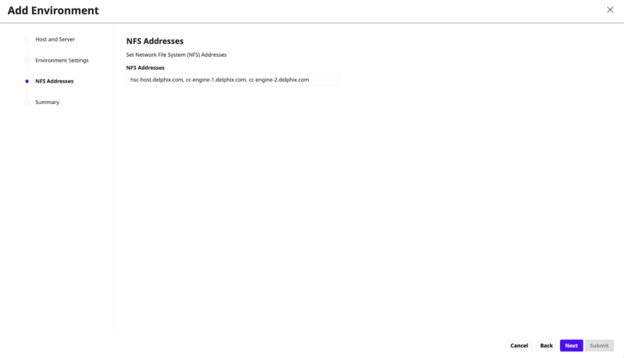
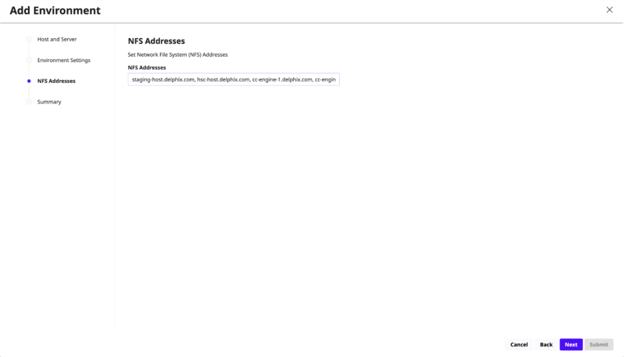
In the NFS Addresses screen, include the addresses of the Hyperscale Compliance engine host(or IP address for nodes of Kubernetes cluster, for a Kubernetes deployment) along with the addresses of the Continuous Compliance Engine part of the Continuous Compliance Engine cluster. This is done to ensure that the empty VDB is shared with both Hyperscale Compliance engine host and the Continuous Compliance Engines part of the Continuous Compliance Engine cluster. See the following examples on how to configure the NFS addresses in case of either Hyperscale Compliance engine host or a separate host as the staging area host.
Examples:
Addresses:
-
Hyperscale Compliance engine host: hsc-host.delphix.com
-
Continuous Compliance Engine 1: cc-engine-1.delphix.com
-
Continuous Compliance Engine 2: cc-engine-2.delphix.com
-
Separate staging area host: staging-host.delphix.com
Hyperscale Compliance engine host as staging area host:
Separate host as staging area host:
Click Next, review the summary page and hit submit to start the process to discover the staging area host.
For more information, see Continuous Data engine’s Vfiles documentation,
Provision an empty VDB
1. Follow the steps listed under Create an Empty VDB for Unstructured Files in the Delphix Engine to provision an empty VDB on the discovered staging area host (can either be the Hyperscale Compliance Host or a separate host as noted in the previous topic).
2. Note the mount path provided while provisioning the empty VDB as that is the path which will be used to fill the empty VDB with the source file(s) that the Hyperscale Compliance engine needs to mask and where the target masked file(s) will be placed.
The location of the mounted empty VDB on the staging area host can be found with a simple ‘grep’ of the mount path, provided while provisioning the empty VDB, using the ‘mount’ utility:
staging-host:~$ df -h | grep /mnt/provision/hyperscale_data

10.119.138.34:/domain0/group-2/appdata_container-3/appdata_timeflow-4/datafile 20T 3.5T

16T 18% /mnt/provision/hyperscale_data
NFS file server
-
An NFS shared filesystem can also be provided by a typical NFS server. Export a filesystem from the NFS file server such that the Hyperscale Compliance engine and Continuous Compliance Engines part of the Continuous Compliance Engine Cluster have read and write permission on it. As such, the export entry should be of the following form based on the UID corresponding to the owner of the shared path:
Copy<mount_path> <ip1,ip2,ip3,ipn>(rw,all_squash,anonuid=65436) -
Export the NFS share using the below command:
Copysudo exportfs -rav [Not required for Virtual Appliance Deployment] Once the NFS share is exported from the NFS server, proceed to mount the same share on the Hyperscale Compliance engine host.
Copysudo mount -t nfs -o vers=4 <nfs-server-host-ip>:<mount_path> <user.home>/hyperscale
Storage requirements for the NFS file server
Considering a single Hyperscale Compliance job execution, the Hyperscale Compliance engine will store unloaded files (unloaded from source ) and masked files. As such, the required storage will amount to 2X the size of the source data.