Configuring masking inventories for complex data types
This page explains how to configure masking_inventories for complex data types in your dataset files, including arrays, structs, and maps. You’ll learn how to:
-
Map complex data type objects to the correct
field_namein themasking_inventoryobject for a job’sdata_set. -
Add date and timestamp fields for accurate masking.
Complex data types
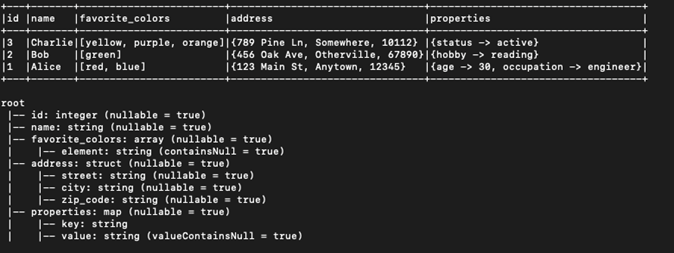
The following sample Parquet file contains both simple and complex data types. The simple types include the id (integer) and name (string) fields and the complex types include an array (favorite_colors), a struct (address), and a map (properties).
Throughout this guide, use this sample file for reference:
Translating data types to Hyperscale
For the id and name fields, add each column to the masking_inventory under the field_name attribute in the dataset payload.
{
  "masking_inventory": [
    {
      "field_name": "id",
      "domain_name": "<Domain>",
      "algorithm_name": "<Masking Algorithm>"
    },
    {
      "field_name": "name",
      "domain_name": "<Domain>",
      "algorithm_name": "<Masking Algorithm>"
    }
  ]
}
Nested objects such as arrays, structs, and maps require the nested field name to be specified using the field_name attribute in the payload. Each child element of the nested object is separated by a /.
For example, in the sample Parquet file, to mask favorite_colors, the field name is specified as favorite_colors/list/element
It is important to note, favorite_colors is the name of the field but it is actually an array/list and in the data structure, element represents the actual value inside the array. Therefore, when instructing the Continuous Compliance Engine to mask the favorite_colors field, the field_name was specified as favorite_colors/list/element
{
  "masking_inventory": [
    {
      "field_name": "favorite_colors/list/element",
      "domain_name": "<Domain>",
      "algorithm_name": "<Masking Algorithm>"
    }
  ]
}
Structs follow the same pattern for specifying field names except you do not need to include the data type in the field_name path. As illustrated in the sample file, the struct is the address field and to mask its child fields, you first need to specify the parent field name, followed by /, and then the child field name. For example, to mask city, use address/city.
{
  "masking_inventory": [
    {
      "field_name": "address/city",
      "domain_name": "<Domain>",
      "algorithm_name": "<Masking Algorithm>"
    },
    {
      "field_name": "address/street",
      "domain_name": "<Domain>",
      "algorithm_name": "<Masking Algorithm>"
    },
    {
      "field_name": "address/zip_code",
      "domain_name": "<Domain>",
      "algorithm_name": "<Masking Algorithm>"
    }
  ]
}
Maps follow the same convention, using / to separate nested fields. In this example, the field_name starts with the parent field name, followed by /. Next, include key_value to specify the data type for the Continuous Compliance Engine, then add another / and the child name which is either key or value for maps.
{
  "masking_inventory": [
    {
      "field_name": "properties/key_value/key",
      "domain_name": "<Domain>",
      "algorithm_name": "<Masking Algorithm>"
    },
    {
      "field_name": "properties/key_value/value",
      "domain_name": "<Domain>",
      "algorithm_name": "<Masking Algorithm>"
    }
  ]
}
Date/timestamp fields
When masking date/timestamp fields, an additional field is required in the masking_inventory object to tell the Continuous Compliance Engine how to format the masked date/timestamp. You will need to add this field name date_format to the payload with a value for the format of the date field to be masked.
Where the <Date-Format> is your data date format, if the date is 2025-08-28 the <Date-Format> will be yyyy-MM-dd.
{
  "masking_inventory": [
    {
      "field_name": "date_of_birth",
      "domain_name": "<Domain>",
      "algorithm_name": "<Masking Algorithm>",
      "date_format": "<Date-Format>"
    }
  ]
}