SAP HANA troubleshooting
Logging
You can find the SAP HANA connector logs at the scratch path within the Delphix Toolkit path on the staging/target environment, located at the following path:
<toolkit path>/Delphix_COMMON_569f894525f1_761938e53692_host/plugin/hana-staged_1af4cd52-4d56-4e78-a12d-2516a0a2714c/HANA/log_hdbadm/delphixHanaDebug.log
Failure during provisioning
Depending on where in the provision process failure occurs, and the type of failure, extra steps may be required:
-
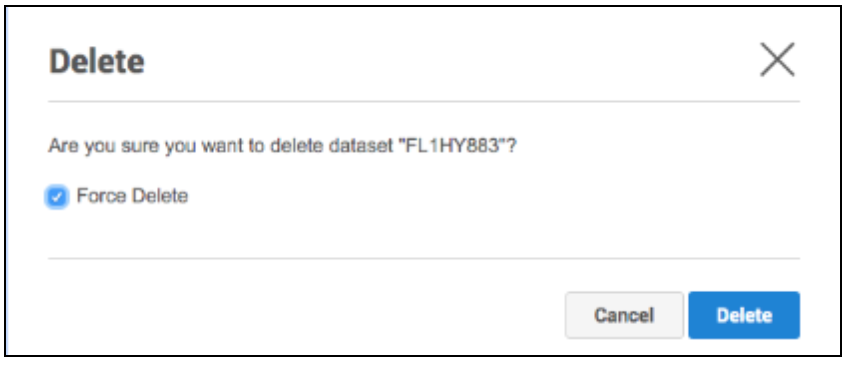
Force Delete of the provision object using the User Interface
-
The Force Delete option will remove underlying filesystems shared from the Delphix Engine, irrespective of any perceived dependencies on these filesystems. If provisioning fails very early in the process, it is common for the Force Delete option to be the only way to remove an object. This may happen when for example, the wrong password has been entered for the target-side system database user.
-
In rare cases, manually removing a failed virtual tenant may be required. For example, a tenant with the name “TST”.
SELECT * FROM M_DATABASES WHERE DATABASE_NAME=’TST’; ALTER SYSTEM STOP DATABASE TST IMMEDIATE; DROP DATABASE TST DROP BACKUPS;
-
If the Force Delete option cannot unmount the virtual tenant mount points, then the unmount command should be run to remove the stale mount points.
umount -lf /mnt/provision/example

Upgrading from Lua to vSDK SAP HANA Plugin
Datasets created using the Lua version (below 6.0.0) cannot be upgraded to the vSDK version. If you have installed a Lua-based plugin for SAP HANA, we recommend you contact your Delphix Account Team for adopting to the latest version given in the table above.
Migrating datasets to the new repository
Users who have active datasets (dSources, VDBs) on the Delphix Continuous Data Engine may upgrade the SAP HANA database on the host to a newer version. In such cases, the existing datasets must be migrated to the new repository.
Follow the steps below to perform the dSource and VDB migration:
Migrate dSources
The dSources are created with the help of Source Config.
Connected source config needs to be moved to the new repository in order to migrate the dSource along with it. And this can be achieved with CLI commands.
Refer CLI Overview for the details.
-
First disable the dSource using the Delphix Engine UI.
-
Log in to the Engine via
sshas stated in the CLI guide. -
Select the concerned
SourceConfig. -
Update it by setting its
repositoryvalue. -
Repository value generally follows the format :
<Environment Name>/<Installation Name>CopyEx. rhel9-hanasp7-tgt.dlpxdc.co/’ HANA 2.00.073.00.1695288802 /usr/sap/HDB/HDB00’ -
Refer example below for the relevant commands and values.
Delphix recommends refer the CLI Guide to understand the available commands.
The commands listed below is relevant to migrate dSources:
Copyls -> sourceconfig -> ls -> select <sourceConfig name> -> update -> set repository -> <Enter repository value> -> commit -> ls
Where:
-
lscommand : Run to list options -
Sourceconfig: Run to choose sourceConfig option -
Select <object name>: Run to select an object for an update, delete or any other operation. -
Update: Run to update the selected object -
Set repository: Run to set the ‘repository’ value. Follow the above mentioned format. -
Commit: Run to commit and save the changes
Migrate VDBs
Delphix Engine UI allows you to migrate the VDBs.
-
Disable the VDBs created on the old repository.
-
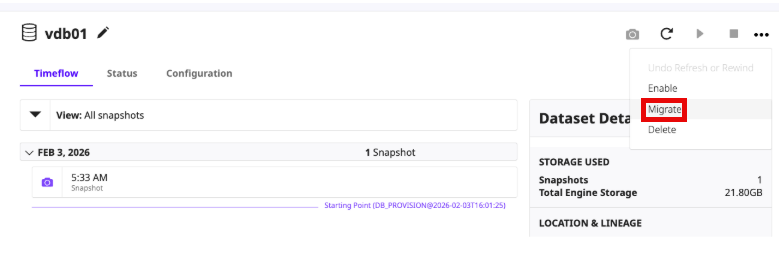
Click on the Migrate option, from the top right corner.
-
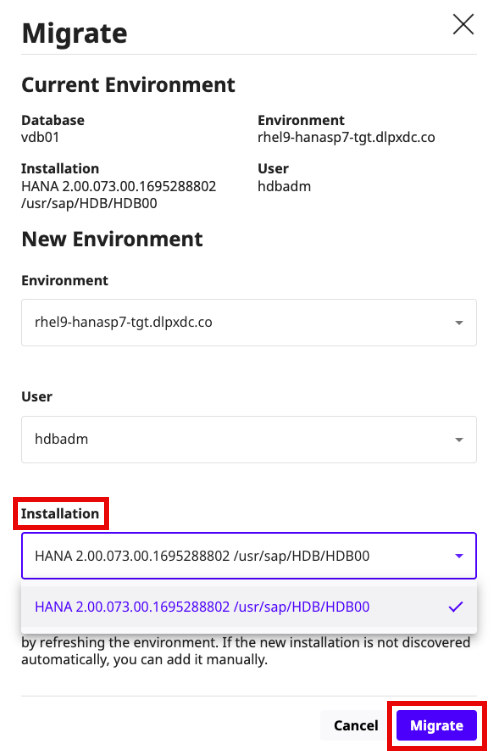
Select the target repository from the Installations drop down and click on Migrate.
-
The VDB is migrated to the target repository selected.