Requirements for SQL Server environments
This sections covers the following topics:
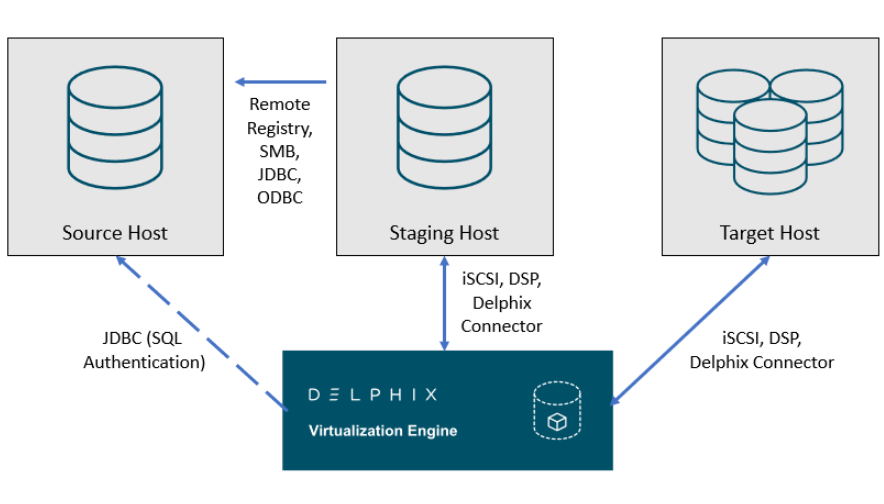
Delphix SQL server architectural diagram - Traditional pull architecture
This diagram depicts the environments and hosts with which the Delphix Engine interacts. Each type of environment has different requirements, which are described below.
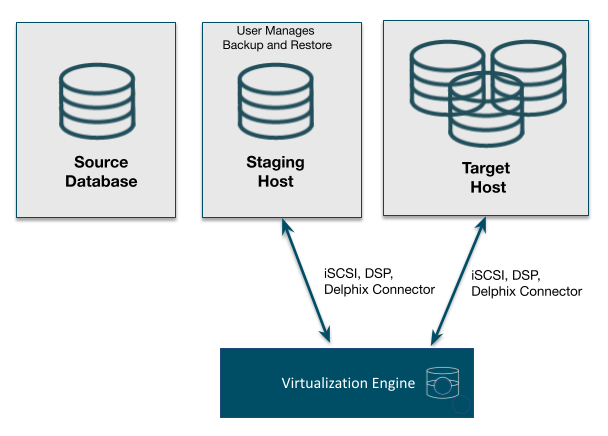
Delphix SQL server architectural diagram - staging push architecture
This diagram depicts the Staging and target hosts with which the Delphix Engine interacts. Note that the Delphix Engine does not interact with the Source Database. For more details on the Staging Push mechanism, see Staging Push Mechanism with SQL Server and Staging Push Implementation for SQL Server.
Supported roles for Failover Cluster instances and Always On Availability Groups
The following table shows how different SQL Server instance types should be added from the Add Environment screen:
| Environment Role | ||||
|---|---|---|---|---|
|
Instance Type |
Added As |
Source Environment |
Staging Environment |
Target Environment |
|
Standalone Instance |
Standalone |
Y * |
Y |
Y |
|
Failover Cluster Instance (FCI) |
Standalone |
Y * |
N |
N |
|
Failover Cluster Instance (FCI) |
Cluster |
N |
N |
Y |
|
Always On Availability Group (AG) |
Cluster |
Y |
N |
Y |
* Databases that are participating in Availability Groups will not be discovered during the discovery of a Standalone environment.
A Failover Cluster Instance added as an environment once (as either a Source or Target environment) cannot be used as both a Source and Target.
If this is required, the environment can be added twice:
-
Once as a Standalone Source environment
-
Once as a Cluster Target environment
The Standalone Source environment can be used for linking dSources, and the Cluster Target environment is used for provisioning VDBs.
Microsoft SQL Server bypass PowerShell execution policy
Hooks are executed with “PowerShell -ExecutionPolicy RemoteSigned” whereas user-configured pre/post sync and pre/post provision PowerShell scripts are executed with “PowerShell -ExecutionPolicy Bypass”. If this PowerShell configuration exceeds the security privileges of business standards, a Group Policy Object can be configured in Windows to manage PowerShell execution policy. If configured, we require that the script execution policy is set to “RemoteSigned”. The primary benefit is that the Group Policy configuration takes precedence and overrides the execution policy set in PowerShell, even if you run PowerShell as an Administrator. Alternatively, using MSSQL hooks instead of pre/post scripts will naturally execute with a “RemoteSigned” execution policy.
Refer to the Microsoft Documentation on Execution Policies for more information: https://docs.microsoft.com/en-us/powershell/module/microsoft.powershell.core/about/about_execution_policies?view=powershell-6