Release notes (ServiceNow)
Version 4.5.0 - December 26, 2025
New catalog capabilities
The Enable Catalog Access catalog item can now automatically assign the two lower-privileged Delphix roles x_dr_delphix_sgc.user_user and x_dr_delphix_sgc.db_role to the required user.
Version 4.4.0 - October 10, 2025
Zurich release support
Added the ServiceNow Zurich release to our compatibility list.
New catalog capabilities
This release includes the following updates:
-
New catalog items and flows have been added:
-
Enable Catalog Access streamlines the onboarding process for new users.
-
Create Bookmark and Delete Bookmark allows for bookmark creation and deletion from DCT.
-
Refresh VDB from Self allows you to refresh a VDB using an existing snapshot list.
-
-
Refresh VDB from Parent’s Snapshot and Refresh VDB from Relative's Snapshot are no longer in beta and are fully supported.
-
Rollback VDB from Snapshot and Rollback VDB from Bookmark are now deprecated and removed from the Catalog list.
Refer to ServiceNow for the updated catalog items and flow listings.
Feature enhancements
This release made the following enhancements to drop-down items in the user interface:
-
Timestamps in ServiceNow match the corresponding timestamps in DCT.
-
For snapshots, timestamps are now displayed in chronological order.
-
Drop-down items now display the dSource and VDB name instead of the ID.
Version 4.3.1 - January 15, 2025
Xanadu and Yokohama release support
-
Added the ServiceNow Xanadu release to our compatibility list.
-
Added the ServiceNow Yokohama release to our compatibility list. (Updated June 30, 2025).
Version 4.3.0 - December 9, 2024
New catalog capabilities
Added a Query VDBs action to the spoke's APIService script. Flows and custom client catalog scripts can use this capability to identify VDBs based on a user's permissions at runtime.
Beta features
The following beta features have been added to the catalog and flows items:
-
Refresh VDB from Parent’s Snapshot
-
Refresh VDB from Relative’s Snapshot
These catalog items are not enabled by default. To enable, you (ServiceNow Admin user) will need to activate the catalog items from your settings.
Delphix cannot guarantee support on features that are still in beta.
Version 4.2.0 - September 6, 2024
ServiceNow Vancouver and Washington Release Compatibility
-
Added support for the Vancouver and Washington releases.
-
Removed support for the Utah and Tokyo releases.
Bug Fixes
-
Resolved an issue where actions, such as provisioning and refreshing, would fail if they took longer than one minute to complete.
-
Resolved an issue where the Provision actions required a `cluster_nodes_id` value.
Version 4.1.0 - May 9, 2023
General Data Control Tower Enhancements:
Added support for the ‘API Usage Report’ introduced in DCT v6.0.0. Users can now reference the following key-value pairs when generating the report to understand their usage patterns.
-
User-agent: ServiceNow-<Spoke_Version>
-
Client-name: ServiceNow
This Client Telemetry information is included in all shared support bundles to improve our user experience. For more details, refer to the DCT documentation.
ServiceNow Utah Release Compatibility:
Added support for the ServiceNow Platform's Utah release.
Please note, we anticipate ServiceNow to announce the deprecation of the San Diego release in the coming weeks. At that point, we will do the same.
Version 4.0.0 - April 6, 2023
Access Scoping:
The Delphix Spoke for ServiceNow version 4.0.0 now utilizes DCT’s Role-based Access Control (RBAC). Through RBAC, you can restrict end users’ access to information at both broad and granular levels. Based on the user’s roles and permissions granted in DCT, available Delphix objects, such as VDBs and Bookmarks, are automatically presented or restricted within the ServiceNow Catalog. In addition, the actions themselves, such as provisioning and refreshing, are performed by the user. This implementation ensures seamless governance across your data landscape. More information on how to configure RBAC in DCT can be found here.
The Delphix Spoke adds a new User(x_dr_delphix_sgc_user) table to map ServiceNow and DCT users. Users must be added to this table before they can use the default Delphix catalog. If you are upgrading versions, please consult the configuration directions for more information.
Property Scoping:
Added property scoping capabilities to refine Bookmark and Snapshot selection based on the selected VDB. Users can select applicable values based on the previously selected VDB.
Improved Catalog Item Output Details:
Updated each catalog item’s completion output to provide improved direction.
Updated Components
Catalog Items
All the catalogs have been modified as a dropdown listing the options available for the user. These values are populated based on the user’s role-based access in Delphix’s DCT environment.
(Updated) Rollback VDB from Snapshot
Catalogs in the 3.0.0 release, Delphix: Rollback VDB from Timestamp, and Delphix: Rollback VDB from Snapshot are merged as a single catalog, Rollback VDB from Snapshot. In this catalog, the user can select the available snapshot or timestamp from the dropdown.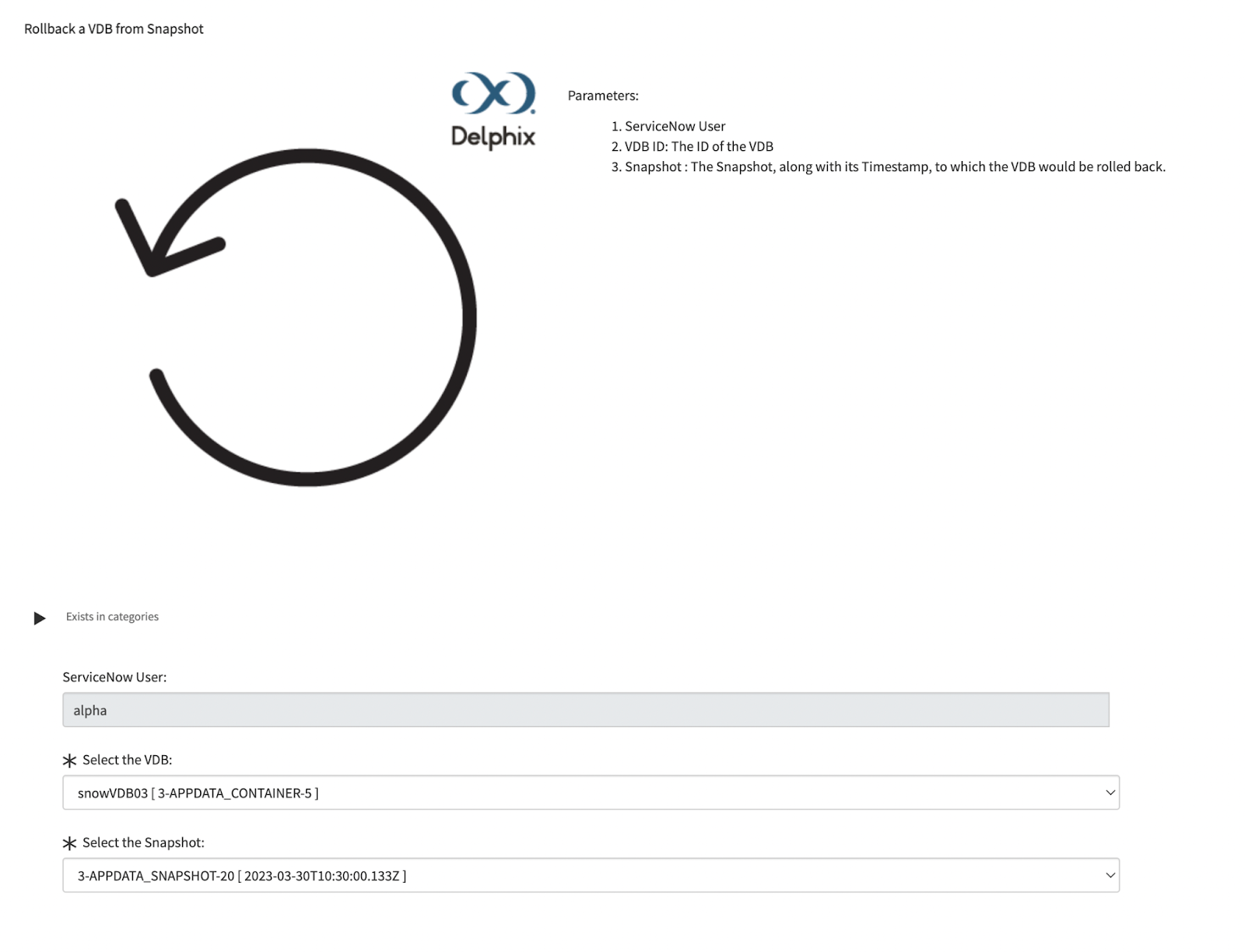
(Updated) Rollback VDB from Bookmark
The catalog has been changed to populate dropdown values dynamically based on the user’s role-based access in Delphix’s DCT.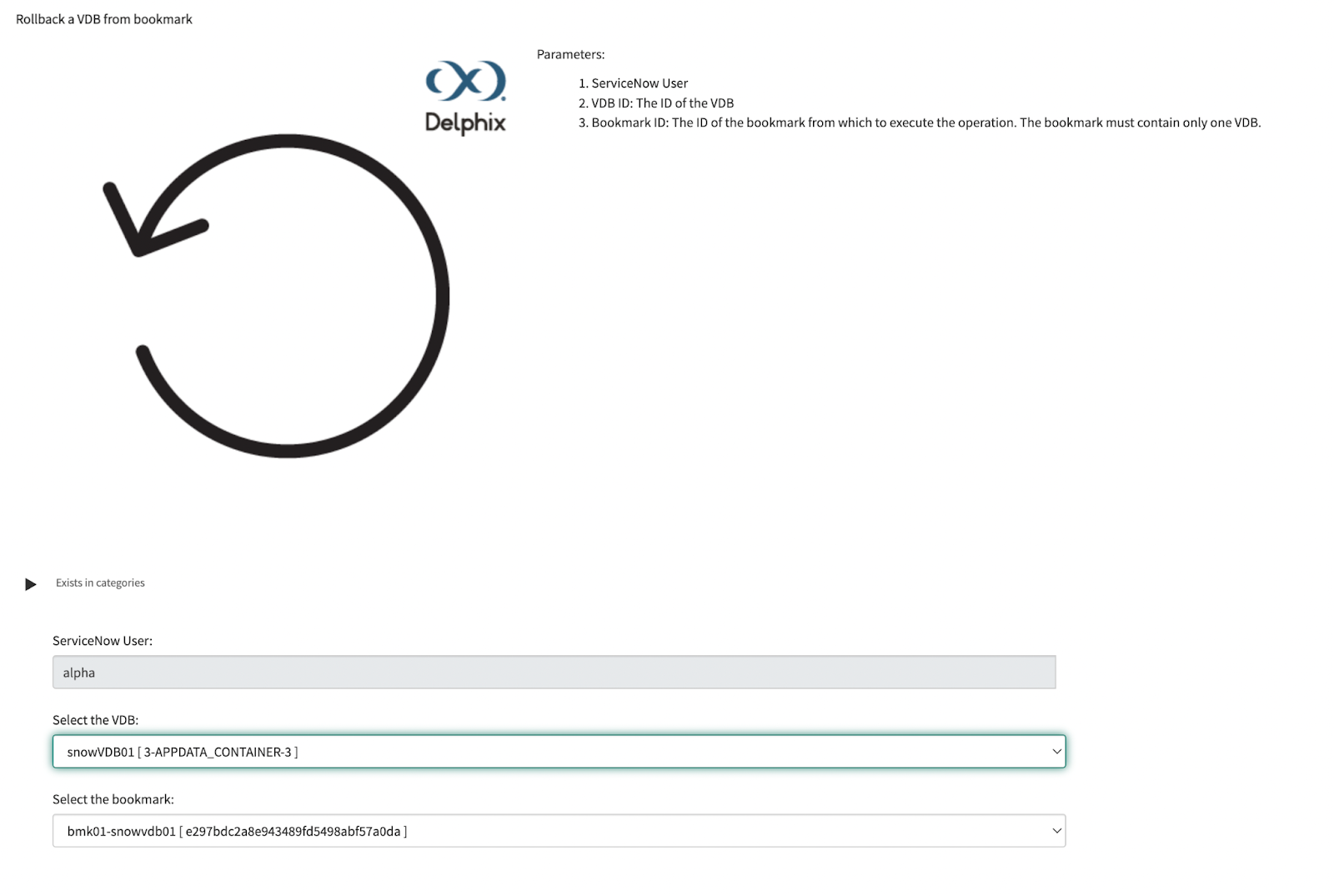
(Updated) Refresh VDB from Bookmark
The catalog has been changed to populate dropdown values dynamically based on the user’s role-based access in Delphix’s DCT.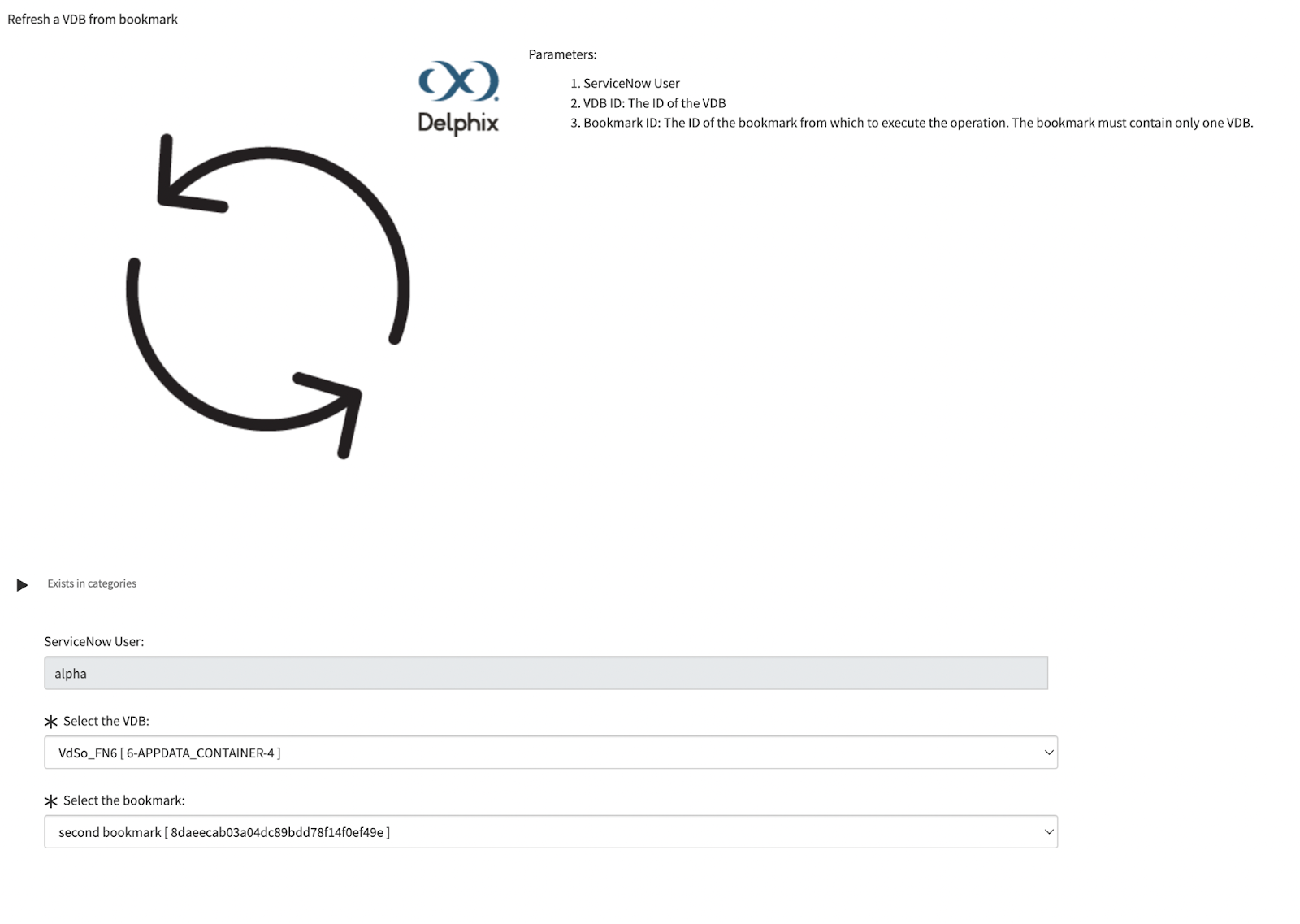
(Deleted) Rollback VDB from Timestamp
The catalog has been deleted. The same functionality can be achieved with “Rollback VDB from Snapshot”.
Flows and Subflows
Due to the change in our catalog item runtime model, the “Delphix Spoke All Data Table Refresh” flow and its sub-flows are no longer required. These flows have been deleted.
Actions
The following Actions were implemented to facilitate the property scoping functionality. These actions will be valuable if you decide to build custom catalog items.
-
Bookmark
-
Query Bookmark - Returns a list of Bookmarks given a set of criteria.
-
Get Bookmark By ID - Return the Bookmark’s details given its ID.
-
-
VDB
-
Get VDB By ID - Return the VDB’s details given its ID.
-
Get Snapshot By ID - Return the Snapshot’s details given its ID.
-
Tables
User(x_dr_delphix_sgc_user) - This table is used to map the relationship between a ServiceNow and DCT user. Administrators can manually or automatically manage the modification of this table.
Version 3.0.0 - January 4, 2023
The Delphix Spoke for ServiceNow version 3.0.0 introduces new catalog items to jumpstart implementation and actions to rollback virtual databases (VDBs). You can now more finely control your development and testing databases through a data catalog request. In addition to the current actions (retrieve, refresh, and delete various objects), a ServiceNow Flow developer can build new complex workflows to meet your Data DevOps requirements.
New Catalog Items
Delphix: Rollback VDB from Bookmark
Software Catalog item that runs an automated flow to rollback a Delphix Engine’s VDB from a provided Bookmark.
Delphix: Rollback VDB from Snapshot
Software Catalog item that runs an automated flow to rollback a Delphix Engine’s VDB from a provided Snapshot.
Delphix: Rollback VDB from Timestamp
Software Catalog item that runs an automated flow to rollback a Delphix Engine’s VDB from a provided timestamp values.
New Flows and Subflows
Delphix Spoke All Data Table Refresh
Regularly scheduled ServiceNow subflows to ensure all Delphix objects are kept in sync with ServiceNow. Now each table is refreshed/synced in parallel using subflows.
Refresh VDB and Snapshot for VDB Data Table
Subflow to ensure all VDBs and Snapshots for VDB are kept in sync with ServiceNow.
Refresh Snapshot for dSource Data Table
Subflow to ensure all Snapshots for dSources are kept in sync with ServiceNow.
Refresh Bookmark Data Table
Subflow to ensure all Bookmarks are kept in sync with ServiceNow.
New Actions
Bookmark: Create a Bookmark at the current time.
Version 2.0.0 - October 4, 2022
The Delphix Spoke for ServiceNow version 2.0.0 introduces new catalog items to jumpstart implementation and actions to provision and rollback virtual databases (VDBs). You can now more finely control your development and testing databases through a data catalog request. In addition to the current actions (retrieve, refresh, and delete various objects), a ServiceNow Flow developer can build new complex workflows to meet your Data DevOps requirements.
New Catalog Items
Refresh VDB from Bookmark
Software Catalog item that runs an automated flow to refresh a Delphix Engine’s VDB from a provided bookmark.
New Flows
Delphix Spoke Data Tables Refresh
Regularly scheduled ServiceNow flow to ensure all Delphix objects are kept in sync with ServiceNow.
New Actions
-
Environment
-
Create an Environment
-
-
VDBGroups
-
Create VDB Group
-
Refresh VDBGroup using Bookmark
-
-
VDBs
-
Provision VDB from Bookmark
-
Provision VDB from Group Bookmark
-
Provision VDB from Snapshot
-
Provision VDB from Timestamp
-
Rollback VDB using Bookmark
-
Rollback VDB using Snapshot
-
Rollback VDB using Timestamp
-
Multiple options can be selected.
Version 1.0.0
The Delphix Spoke for ServiceNow version 1.0.0 introduces new actions to retrieve, refresh, and delete Delphix Continuous Data objects, such as virtual Oracle or SQL databases, within your standard ITSM practices. Through this Spoke, we have brought the power of the Delphix Data Platform to ServiceNow so development and test teams can better manage their test data processes.
Delphix Spoke for ServiceNow supports the following actions:
New Actions
-
Bookmarks
-
Delete Bookmark
-
Get all Bookmarks
-
Search Bookmarks for VDB
-
-
dSources
-
Get all dSources
-
Get Snapshots for a dSource
-
-
Environment
-
Delete An Environment
-
Get all Environments
-
-
Jobs
-
Get Job Details
-
-
Management
-
Get all Engines
-
-
VDBGroups
-
Delete VDBGroup
-
-
VDBs
-
Delete VDB
-
Get all VDBs
-
Get Snapshots for a VDB
-
Refresh VDB by Snapshot
-
Refresh VDB by Timestamp
-
Refresh VDB from Bookmark
-