OBI virtualization process
Oracle Backup Ingestion plugin helps to virtualize Oracle data source leveraging Oracle built-in RMAN technology.
OBI architecture overview
Various Oracle configurations ranging from Oracle RAC to Oracle multi-tenant can be used with Delphix. This article contains an overview of how Delphix works with Oracle.
There are three key concepts when using Delphix with any data platform:
-
Environments: The server and software required to run a data set. For Oracle, this will be an operating system host with Oracle instances running on it.
-
Staging Environment: Source data is ingested into Delphix using Staging Host. These will be used to create dSources.
-
Target Environment: Target hosts to provision VDBs. These need Oracle installations that correspond to the versions of the Source environments, per our Oracle Support Matrix.
-
-
dSources: A database that the Delphix Virtualization Engine uses to create and update virtual copies of your database
-
VDBs: A database provisioned from either a dSource or another VDB which is a copy of the source data. A VDB is created and managed by the Delphix Virtualization Engine. Explore how Delphix connects to Oracle environments and creates Oracle dSources and VDBs, with these concepts in mind.
Environment linking and provisioning architecture
As shown in the diagram below Delphix begins by ingesting data from your source database backups to create dSources. Data is ingested using existing backups on Disk or Tape. Once you have added an environment, Delphix will automatically ‘discover’ Oracle Homes on it. This means we are looking for any compatible data sources we could ingest from to create new dSources.
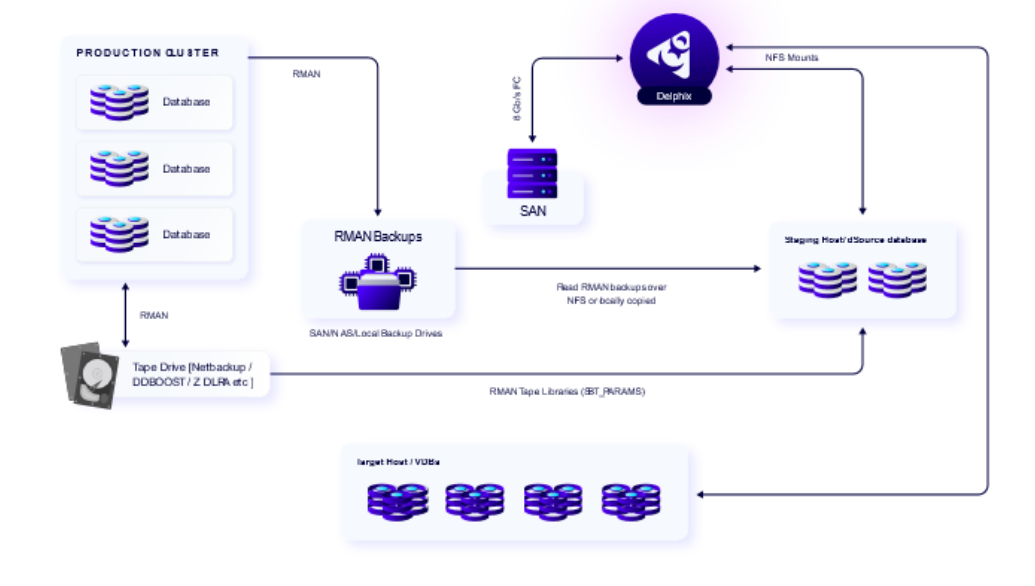
Supported backup bechanisms:
-
Disk backup: Backup located on disk and available on Staging host
-
Disk Backup: Backups stored on linux filesystem and accessible by delphix user on staging host.
-
Oracle RDS: Amazon RDS for Oracle is a fully managed commercial database that makes it easy to set up, operate, and scale Oracle deployments in the cloud. Oracle RDS backups stored on S3 bucket can be Ingested into Delphix using s3fs OR Oracle Secure Backup (OSB) module. s3fs allows Linux to mount an S3 bucket via FUSE. s3fs preserves the native object format for files. Backups stored on s3fs can be accessed via filesystem. While this is supported, s3fs seems to be little unstable and tuning may be needed. Delphix recommends to use OSB instead of s3fs if possible.
-
-
Tape backup: Backup client / libraries need to be installed on Staging host
-
Netbackup: NetBackup integrates the database backup and recovery capabilities of the Oracle Recovery Manager (RMAN) with the backup and recovery management capabilities of NetBackup.
-
DDBoost: DDBoost plug-in is an software library that - when integrated with backup applications using TCP/IP - utilizes TCP/IP connections as directed by backup software
-
OSB: OSB Cloud Module is part of the OSB product family and provides the flexibility to back up your database to the Amazon S3 Cloud and to tape. With this cloud offering, local disk backups are sent directly to Amazon S3 for offsite storage and are fully integrated with RMAN features and functionality
-
ZDLRA: The Oracle Zero Data Loss Recovery Appliance is a computing platform that includes Oracle Corporation Engineered Systems hardware and software built for backup and recovery of the Oracle Database.
Multiple wallets ( TDE / Credentials ) are supported viasqlnet.orafile.
-
OBI plugin allows you to use existing Oracle RMAN Backups as the source of dataset in Delphix. OBI Plugin supports following use cases:
-
Create SEED database which you can fill with any data you like through any technique (SQL*Plus, RMAN backups, datapump, SQL statements, JDBC etc). Periodic snapshots can be taken and VDBs can be created from this database.
-
Full Database Ingestion from disk or Tape backup.
-
Subsetting [ Partial Database Ingestion (one or more tablespaces) from disk / Tape backup ].
-
Subsetting [ Partial Database Ingestion (Single PDB) from disk or Tape backup ].
-
Production Lockdown [ Create dSource without touching production ].
-
Ingest TDE enabled 11.x, 12.x, 18.x, 19.x Multi-Tenant database.
-
Ingest Backups using Tape libraries [ Netbackup, ZDLRA, DDBOOST, AWS S3 (Oracle Secure Backup) etc. ]
-
Ingest from Oracle Application Containers [ Supported only for Full dSource Type ]
-
Delphix OBI Plugin does not manage or clean up archive logs.
-
Delphix operations do not require archive logs, so they can be safely managed according to the customer’s retention policies.