Kubernetes Operator
The Delphix K8s Operator is a cloud-native Kubernetes Operator that brings Delphix database virtualization fully into the Kubernetes control plane. Rather than manually crafting PVC manifests and container deployments, you declare the desired state of a virtual database using Kubernetes Custom Resources (CRDs). The operator's controllers continuously reconcile the desired state against the actual state, orchestrating DCT, the CSI driver, and the PostgreSQL pod lifecycle automatically.
Operator components
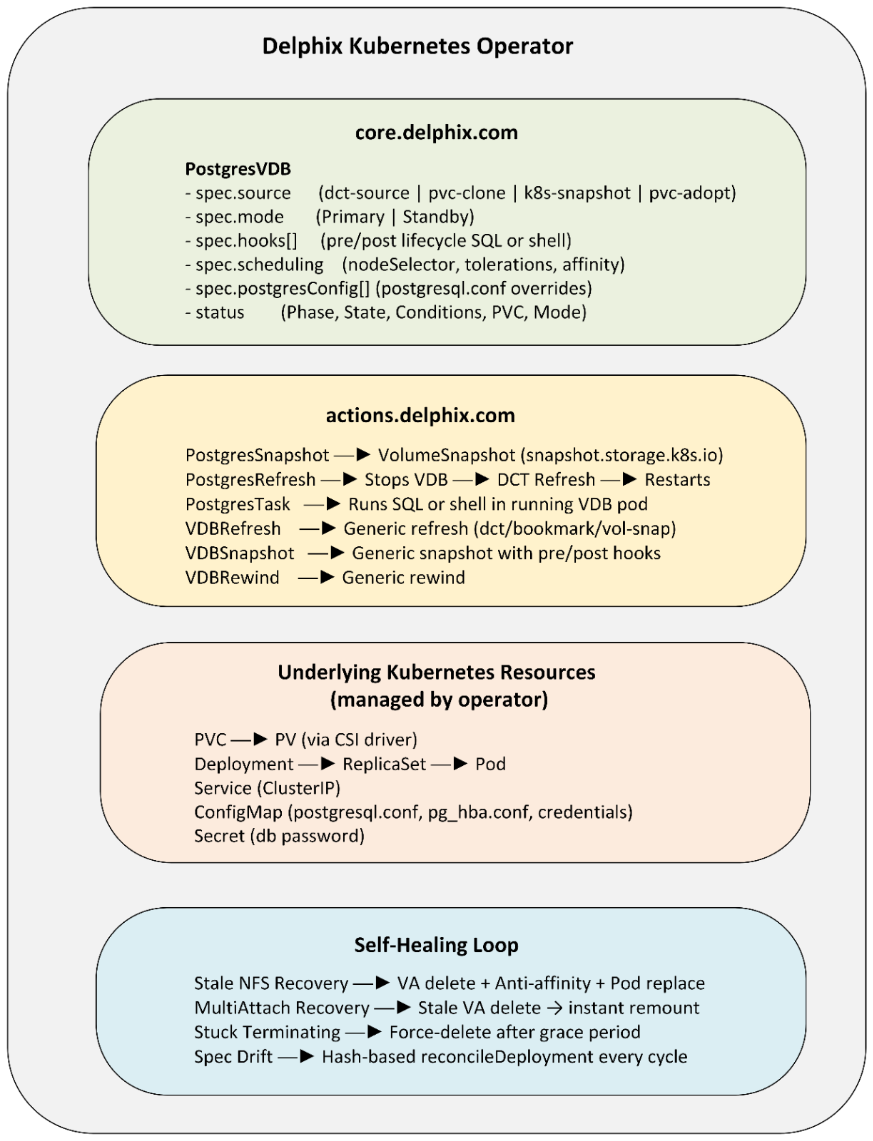
Custom Resource Definitions (CRDs)
For detailed information on all parameters supported by the Delphix Kubernetes Operator Custom Resource Definitions (CRDs), refer to Kubernetes Custom Resource Definition (CRD)
The operator installs nine CRDs across two API groups:
core.delphix.com - virtual database lifecycle and actions.delphix.com - operational actions on VDBs
core.delphix.com - Virtual database lifecycle
| CRD | Description |
|---|---|
| PostgresVDB | Defines a virtual PostgreSQL database - its source, configuration, resources, and lifecycle hooks. |
actions.delphix.com - operational actions on VDBs
| CRD | Description |
|---|---|
| VDBSnapshot | Triggers a point-in-time volume snapshot of a PostgresVDB |
| VDBRefresh | Refreshes a VDB from the latest or a specified snapshot (DCT snapshot, DCT bookmark, or volume snapshot). |
| VDBRewind | Reverts a VDB to a prior snapshot state |
| Task | Generic task execution framework |
| PostgresSnapshot | Creates a PostgreSQL-consistent snapshot with pre/post backup coordination and LSN capture. |
| PostgresRefresh | Full orchestrated refresh for PostgreSQL with pre/post hooks, mode enforcement, and phase tracking. |
| PostgresRewind | Full orchestrated rewind for PostgreSQL with hook support. |
| PostgresTask | Executes SQL or shell commands against a running PostgresVDB |
Provision and Enable (PostgreSQL - Operator path)
Unlike the Driver path which requires a separately authored PVC manifest and container deployment manifest the Operator path uses a single PostgresVDB resource manifest that declaratively specifies the full desired state. To provision and enable the virtual database, complete the following five steps:
-
Create a PostgresVDB manifest
apiVersion: core.delphix.com/v1alpha1
kind: PostgresVDB
metadata:
  name: my-postgres-vdb
  namespace: pg-operator
spec:
  enabled:true
  source:
    type: dct-source
    reference: "your-delphix-engine:your-dsource-name"  # engine:dsource
  vdbGroupName: "Untitled"
  envName: "dev-env"
  port: 5493
  image: "postgres:16.2"
  database:
    name: "postgres"
    user: "postgres"
    passwordSecretRef: my-db-password    # kubernetes opaque secret with password
  resources:
    requests:
      cpu: "500m"
      memory: "1Gi"
    limits:
      cpu: "2"
      memory: "4Gi"
  postgresConfig:
     - name: “shared_buffers”
        value: “256MB”
      - name: "max_wal_senders"
        value: “4”
      - name: "max_connections"
        value: “100”
-
Apply the manifest:
kubectl apply -f my-postgres-vdb.yaml -
Monitor the VDB lifecycle - use the following CLI commands to monitor the PostgresVDB resource and Operator activity:
-
Watch lifecycle status (phases: Pending → Provisioning → Configuring → Deploying → Ready):
kubectl get postgresvdb my-postgres-vdb -n pg-operator -w
-
View detailed status and conditions:
kubectl describe postgresvdb my-postgres-vdb -n pg-operator -
Operator logs:
kubectl logs -n pg-operator -l app.kubernetes.io/name=delphix-operator -f
-
-
Connect to the VDB ( port-forwarding):
-
kubectl port-forward svc/my-postgres-vdb 5493:5493 -n postgres-operator -
psql -h localhost -p 5493 -U postgres -d postgres
-
Connect to the VDB ( ssh into pod)
The pod name format is <deployment-name>-<replicaset-hash>-<pod-suffix>:
-
my-postgres-vdb — Deployment name
-
69f7f5b5f — ReplicaSet hash (pod template hash, changes when the pod spec is updated)
-
t9r8j — Pod's unique random suffix (changes every time the pod is recreated)
kubectl exec -it pod/my-postgres-vdb-<replicaset-hash>-<pod-suffix> -n postgres-operator -- /bin/sh
VDB status phases
| Phase | Meaning |
|---|---|
| Pending | CRD accepted, awaiting reconciliation |
| Provisioning | PVC being created via DCT/CSI driver |
| Configuring | PostgreSQL configuration being applied |
| Deploying | Pod being started |
| Ready | VDB is fully operational |
| Stopped | VDB is disabled (enabled: false) |
| Error | Reconciliation failed - check conditions |
| Terminating | VDB is being destroyed |
Supported source types
The operator supports three source types for PostgresVDB.spec.source.type:
| Source type | Description | Reference format |
|---|---|---|
| dct-source | Provisions from a Delphix dSource or VDB via DCT | engine-name:dsource-name |
| pvc-clone | Clones an existing PVC within the cluster | existing-pvc-name (or namespace/pvc-name) |
| k8s-snapshot | Provisions from an existing Kubernetes VolumeSnapshot | volume-snapshot-name |
| pvc-adopt | Adopts an externally managed PVC (created using the Delphix K8s driver) into operator lifecycle management | existing-pvc-name |
Snapshots
The operator provides two CRDs for snapshots, depending on required consistency level.
VDBSnapshot - Volume-level snapshot (fast, crash-consistent):
apiVersion: actions.delphix.com/v1alpha1
kind: VDBSnapshot
metadata:
  name: my-vdb-snapshot
spec:
  vdbRef:
    kind: PostgresVDB
    name: my-postgres-vdb
    namespace: pg-operator
PostgresSnapshot - Application-consistent snapshot with backup coordination and LSN capture:
apiVersion: actions.delphix.com/v1alpha1
kind: PostgresSnapshot
metadata:
  name: my-postgres-snapshot
spec:
  vdbRef:
    kind: PostgresVDB
    name: my-postgres-vdb
  autoCheckpoint: true
  captureLSN: true
  preSnapshot:
    type: sql
    content: "SELECT pg_start_backup('pre-snapshot');"
  postSnapshot:
    type: sql
    content: "SELECT pg_stop_backup();"
Monitor snapshot status:
1. kubectl get postgressnapshot my-postgres-snapshot
2. kubectl describe postgressnapshot my-postgres-snapshot
Refresh the VDB (Operator path)
The Operator path for VDB refresh is fully automated with no manual DCT UI interaction required. The PostgresRefresh CRD orchestrates the complete workflow: stopping the VDB, performing the refresh via DCT, re-starting the VDB, and running pre/post hooks.
Refresh from latest snapshot:
apiVersion: actions.delphix.com/v1alpha1
kind: PostgresRefresh
metadata:
  name: my-vdb-refresh
  namespace: pg-operator
spec:
  vdbRef:
    name: my-postgres-vdb
    namespace: pg-operator
    kind: PostgresVDB
  snapshotRef:
     type: dct-snapshot
     name: "1-APPDATA_SNAPSHOT-1029"
Refresh from a specific snapshot:
apiVersion: actions.delphix.com/v1alpha1
kind: PostgresRefresh
metadata:
  name: my-vdb-refresh
  namespace: pg-operator
spec:
  vdbRef:
    name: my-postgres-vdb
    namespace: pg-operator
    kind: PostgresVDB
  snapshotRef:
     type: dct-snapshot
     name: "1-APPDATA_SNAPSHOT-1029"
Refresh from a specific DCT bookmark:
apiVersion: actions.delphix.com/v1alpha1
kind: PostgresRefresh
metadata:
  name: my-vdb-refresh-from-bookmark
spec:
  vdbRef:
    name: my-postgres-vdb
    namespace: pg-operator
    kind: PostgresVDB
  snapshotRef:
    type: dct-bookmark
    name: my-bookmark-name
Refresh from a Kubernetes VolumeSnapshot:
apiVersion: actions.delphix.com/v1alpha1
kind: PostgresRefresh
metadata:
  name: my-vdb-refresh-from-snapshot
spec:
  vdbRef:
    name: my-postgres-vdb
    namespace: pg-operator
    kind: PostgresVDB
  snapshotRef:
    type: volume-snapshot
    name: my-volume-snapshot-name
Refresh Workflow Phases:
| Phase | Description |
|---|---|
| Pending | Refresh queued |
| PreRefresh | Pre-refresh hooks executing |
| Stopping | VDB pod being stopped |
| Refreshing | DCT refresh operation in progress |
| Starting | VDB pod being restarted |
| PostRefresh | Post-refresh hooks executing |
| Finalizing | Cleanup and validation |
| Completed | Refresh complete |
| Error | Refresh failed - check .status.lastError |
Compare with the Driver path:
| Step | K8s Driver path | K8s Operator path |
|---|---|---|
| 1 | kubectl delete -f container-manifest.yaml | kubectl apply -f postgres-refresh.yaml |
| 2 | Manual refresh via DCT UI/API | (Operator handles automatically) |
| 3 | kubectl apply -f container-manifest.yaml | (Operator handles automatically) |
Rewind the VDB (Operator path)
apiVersion: actions.delphix.com/v1alpha1
kind: VDBRewind
metadata:
  name: my-vdb-rewind
  namespace: pg-operator
spec:
  vdbRef:
    kind: PostgresVDB
    name: my-postgres-vdb
    namespace: pg-operator
# Optional; omit for latest snapshot
snapshotRef:
    type: dct-snapshot
    name: "1-APPDATA_SNAPSHOT-1029"
Task Execution
The operator allows running arbitrary SQL or shell commands against a running PostgresVDB without manual pod exec:
apiVersion: actions.delphix.com/v1alpha1
kind: PostgresTask
metadata:
  name: check-schema
  namespace: pg-operator
spec:
  targetRef:
    kind: PostgresVDB
    name: my-postgres-vdb
    namespace: pg-operator
  type: sql
  content: "SELECT schemaname, tablename FROM pg_tables WHERE schemaname = 'public';"
  database: "appdb"
  retryPolicy:
    maxRetries: 3
    delay: 10
Lifecycle Hooks
PostgresVDB supports lifecycle hooks that run SQL or shell commands at key lifecycle stages:
| Hook stage | When it fires |
|---|---|
| post-create | After the VDB is first created and running |
| pre-refresh | Before a refresh operation starts |
| post-refresh | After a refresh operation completes |
| pre-rewind | Before a rewind operation starts |
| post-rewind | After a rewind operation completes |
| pre-snapshot | Before a snapshot is taken |
| post-snapshot | After a snapshot is taken |
Example — initialise schema after creation and clean up after refresh:
spec:
  hooks:
  # Hook 1: Simple command — creates a file on the VDB mount
  - name: "test-command-hook"
    stage: "post-create"
    type: "command"
    script: |
      #!/bin/bash
      echo "Hook executed at $(date)" > /tmp/hook-test.txt
      echo "Hostname: $(hostname)" >> /tmp/hook-test.txt
      echo "User: $(whoami)" >> /tmp/hook-test.txt
      cat /tmp/hook-test.txt
    timeoutSeconds: 30
    continueOnError: false
Disable and Delete (Operator path)
Disable VDB (stops the pod, retains the PVC and DCT VDB):
kubectl patch postgresvdb my-postgres-vdb -p '{"spec":{"enabled":false}}' --type=merge
Re-enable VDB:
kubectl patch postgresvdb my-postgres-vdb -p '{"spec":{"enabled":true}}' --type=merge
Delete VDB (destroys the pod, PVC, and DCT VDB):
kubectl delete postgresvdb my-postgres-vdb –n pg-operator
PVC Annotations (Organizational Metadata)
When the operator creates a PVC for a PostgresVDB, it automatically applies metadata annotations for governance and multi-team management. These are the same annotation keys used by the K8s Driver.
| Annotation | Source | Example Value |
|---|---|---|
| vdbGroupName | Dataset group where the VDB will be created. Should exist in DCT | "production-databases" |
| envName | Staging environment. Auto-extracted from PVC spec for pvc-clone and pvc-adopt | "production" |
| engineName | Auto-extracted from dct-source reference or the PVC spec for pvc-clone and pvc-adopt | "delphix-engine-prod" |
| sourceDBName | Auto-extracted from dct-source reference | "ProductionDB" |
| vdbStageMountpath | Path to mount the dat directory in the container pod | "/mnt/postgres" |
| ownershipSpec | Default User ID for the container image such as 'postgres' | "999:999" |
| delphix.com/created | Set by operator | "true" |
Query PVCs across namespaces by annotation:
kubectl get pvc -A -o json | jq '.items[] | select(.metadata.annotations.vdbGroupName=="production-databases") | .metadata.name'
kubectl get pvc -A -o json | jq '.items[] | select(.metadata.annotations.envName=="production") | .metadata.name'
kubectl get pvc -A -o json | jq '.items[] | select(.metadata.annotations.engineName=="delphix-engine-prod") | .metadata.name'
Query VDBs using labels :
# Find all VDBs from the same source DB (dct-source only)
kubectl get postgresvdb -A -l sourceDBName=my-postgres-vdb
# Find all VDBs cloned from the same source (PVC name, snapshot name, or DB name)
kubectl get postgresvdb -A -l sourceRef=my-postgres-vdb
# Find all VDBs in the same group
kubectl get postgresvdb -A -l vdbGroupName=my-group
# Find all VDBs in the same environment
kubectl get postgresvdb -A -l envName=my-env
# Find all VDBs on a specific engine
kubectl get postgresvdb -A -l engineName=my-engine
# Combine filters
kubectl get postgresvdb -A -l sourceDBName=my-postgres-vdb,envName=my-env