Incremental V2P with SQL Server VDB
Introduction
Incremental Virtual-to-Physical (V2P) tackles common challenges faced by users during critical Ransomware and Disaster Recovery (DR) scenarios such as extensive downtime and operational disruption due to data loss.
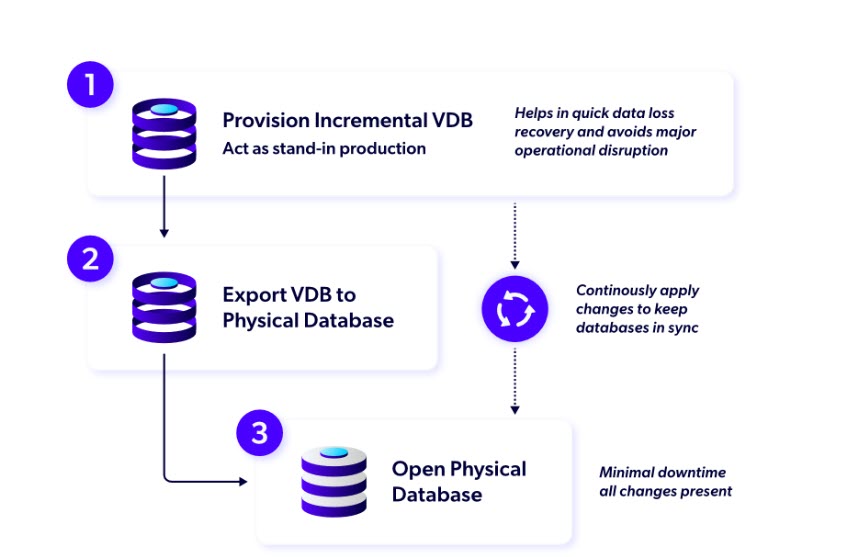
The following steps are required for the Incremental V2P process:
Step 1 – Provision an Incremental VDB
Incremental VDB is a virtual database configured to continuously capture changes at a user‑defined interval. On successful provision, Delphix schedules SQL Server transaction log backups in background via a Backup worker and stores them on the Delphix storage under BACKUP mount. Incremental VDB acts as a stand-in production database, allowing users to restart their operations. For more details, refer to the Initiating incremental V2P on a SQL Server VDB page.
Step 2 – Incrementally export an Incremental VDB
V2P operation exports the Incremental VDB to a physical database and enables continuous application (backup restoration) of captured changes in the background at a fixed frequency to the physical target via Restore worker. It allows you to keep using the VDB until the physical database is recovered. For more details, refer to the Initiating V2P export on a SQL Server VDB page.
Step 3 – Switch from VDB to Physical database
Finally, cut over the stand-in production database to the real production (physical) database. This requires bringing the physical database in sync with Incremental VDB with minimal downtime by restoring the last set of deltas between the two. For more details, refer to the Export Finalize on a SQL Server VDB page.
Feature Limitations
-
Incremental VDB must be provisioned from a dSource snapshot.
-
VDB operations such as Refresh, Rewind, Undo Refresh, Undo Rewind, Upgrade and Migrate are not allowed on Incremental VDB.
-
While exporting, SQL Server instance version must match the source SQL Server instance version.
-
PIT provisioning of Incremental VDB from dSource is not supported.
Unsupported features with V2P
-
Support for DCT API/UI.
-
Support for export to cluster environments.
-
Converting an existing VDB into an incremental VDB or vice versa is not supported.
-
Support for Incremental V2P metadata transfer during Delphix replication. Simply put, Incremental V2P operation cannot be resumed from a replicated target engine.
-
Support multiple Incremental V2P operations from an Incremental VDB.
Prerequisites
-
Incremental VDB must be created only from a dSource with FULL recovery model.
-
Incremental VDB must be provisioned with FULL recovery model.
-
Incremental V2P must be performed using the OLDEST snapshot of Incremental VDB.
Choosing the Right V2P Operation
Traditionally, V2P performs a full export from a Delphix-managed virtual database (VDB) to a physical database and cannot capture changes that occur after the operation starts. Incremental V2P closes this gap by continuously tracking changes in the VDB and applying them to the physical database in parallel. This allows users to keep using the VDB until the physical database is ready to recover with minimal downtime.
Decision Guide: V2P vs Incremental V2P
|
Use Case/Scenario |
Recommended Operation |
Why This Choice Works Best |
|---|---|---|
|
One-Time Physical Database Creation from Snapshot |
V2P |
Full export ensures complete data transfer from virtual to physical. |
| Live Migration with Minimal Downtime | Incremental V2P | Keeps physical DB in sync with VDB using change tracking. |
| Multiple Physical Copies from a Single Source | V2P | Incremental V2P is limited to one instance per VDB container. |
| Disaster Recovery with SLA Constraints | Incremental V2P | Allows users to deploy an Incremental VDB as a temporary production solution while preparing the physical database. |