Incremental Virtual-to-Physical (V2P) for an Oracle dataset
Overview
A critical Ransomware or a Disaster Recovery (DR) situation poses challenges to the users in terms of extensive downtime and operational disruption due to data loss. For example, a ransomware attack on the production environment may compromise the production database and leave it unusable. The Incremental V2P feature tackles these challenges by enabling seamless application continuity and complete recovery of production environments in such scenarios.
Introduction
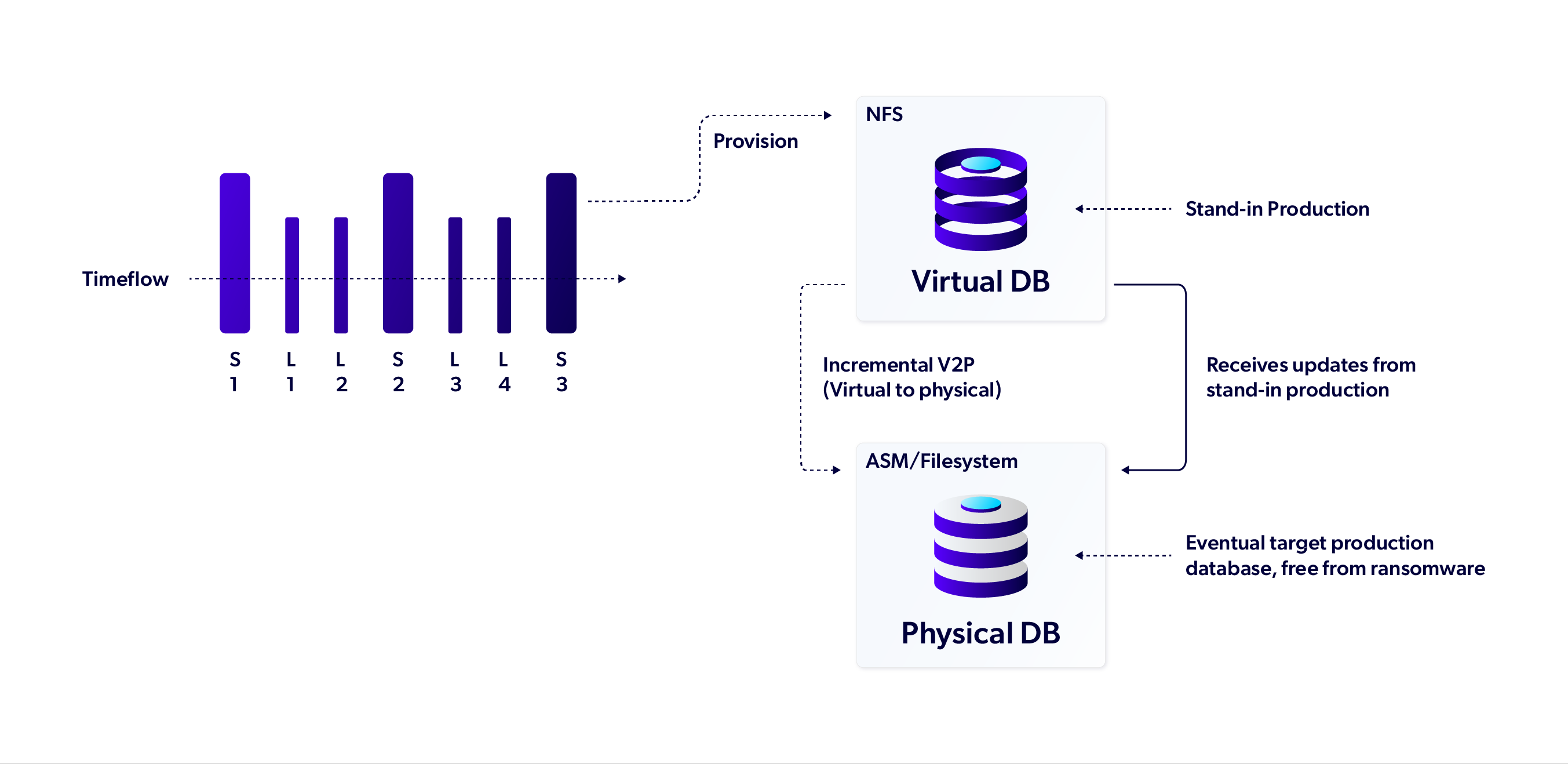
Considering the production database is already ingested into Delphix, the Delphix Engine maintains a collection of snapshots along with archive logs from this database. This collection serves as a repository of backups. In the event of a DR, the user can provision an Oracle virtual database from the last known good snapshot of the production database. This virtual database then acts as a stand-in production database serving the business applications.
Incremental V2P operation initiated on the stand-in production virtual database (a VDB or a vPDB), besides traditional V2P, captures changes from the stand-in production database and incrementally applies them to a new physical database being set up via Incremental V2P.
While traditional V2P data transfers can take hours or days, Incremental V2P ensures the new physical database remains in sync with the stand-in production database, significantly enhancing recovery speed and reliability.
Prerequisites
-
Oracle Managed Files (OMF) must be enabled on the VDB or vPDB.
-
Sufficient storage space must be available in the target ASM diskgroup for datafiles, tempfiles and the target ASM diskgroup for online logs, if specified.
-
Delphix Engine must have sufficient storage space available on the ZFS to store incremental backups of the stand-in production database. The size of these incremental backups depends on the amount of changes for the period and the velocity at which the incrementals are being taken.
-
For Incremental V2P of a PDB source, the new PDB name:
-
must meet all the naming constraints as defined in the Oracle documentation.
-
must be different from the existing PDBs in the target CDB
-
-
For Incremental V2P of a VDB, the new database unique name:
-
must meet all the naming constraints as defined in the Oracle documentation.
-
must be different from the database unique name of any other database on the same host.
-
must be different from the database unique name of any RAC database which has a node on this host even if the node is down.
-
- While exporting from a TDE enabled PDB, refer to the prerequisites in the TDE-enabled VPDB requirements topic.
Salient features
-
The Incremental V2P feature is supported for both multitenant and non-multitenant Oracle databases.
-
Physical database can be on a target host with either Oracle ASM or Physical Filesystem.
-
The Incremental V2P feature is fully supported for TDE-enabled virtual databases.
Procedure
Step 1 – Provisioning a virtual database (stand-in production)
Provision a new (or use an existing) virtual database. It will be the source database against which the Incremental V2P operation will be initiated.
Step 2 – Initiating Incremental V2P
Initiate Incremental V2P operation on the source virtual database. It consists of the following sub-steps that Delphix Engine automatically performs as part of this incremental V2P operation:
-
Provisioning a temporary target virtual database from the stand-in production database.
-
Exporting its datafiles to physical storage on the target host.
-
Bringing up the physical database on the target host in MOUNT mode.
-
Refreshing the new physical database periodically with data from the stand-in production.
Refer to Virtual to Physical (V2P) operation for a snapshot or a Timeflow point of a multitenant pluggable Oracle database to ASM or Physical Filesystem and Virtual to Physical (V2P) operation a snapshot or a Timeflow point of a non-multitenant Oracle database to ASM or Physical Filesystem for detailed steps to perform the incremental V2P operation from CLI.
The physical database created above could be way behind the stand-in production database because of all the writes happening to stand-in production while the V2P job was in progress. To bring the physical database in sync with source database, Delphix Engine takes periodic backups from the stand-in production database and applies them onto the target physical database. The periodic backups are stored on Delphix Engine’s ZFS storage and don’t require space on the host.
Step 3 – Finalizing Incremental V2P
Finalizing Incremental V2P is a controlled cutover step that ensures data integrity between stand-in production virtual database and physical database. It completes an in-progress Incremental V2P operation. Once the source and target databases are reasonably synced, the Finalize Incremental V2P operation can be initiated on the source database.
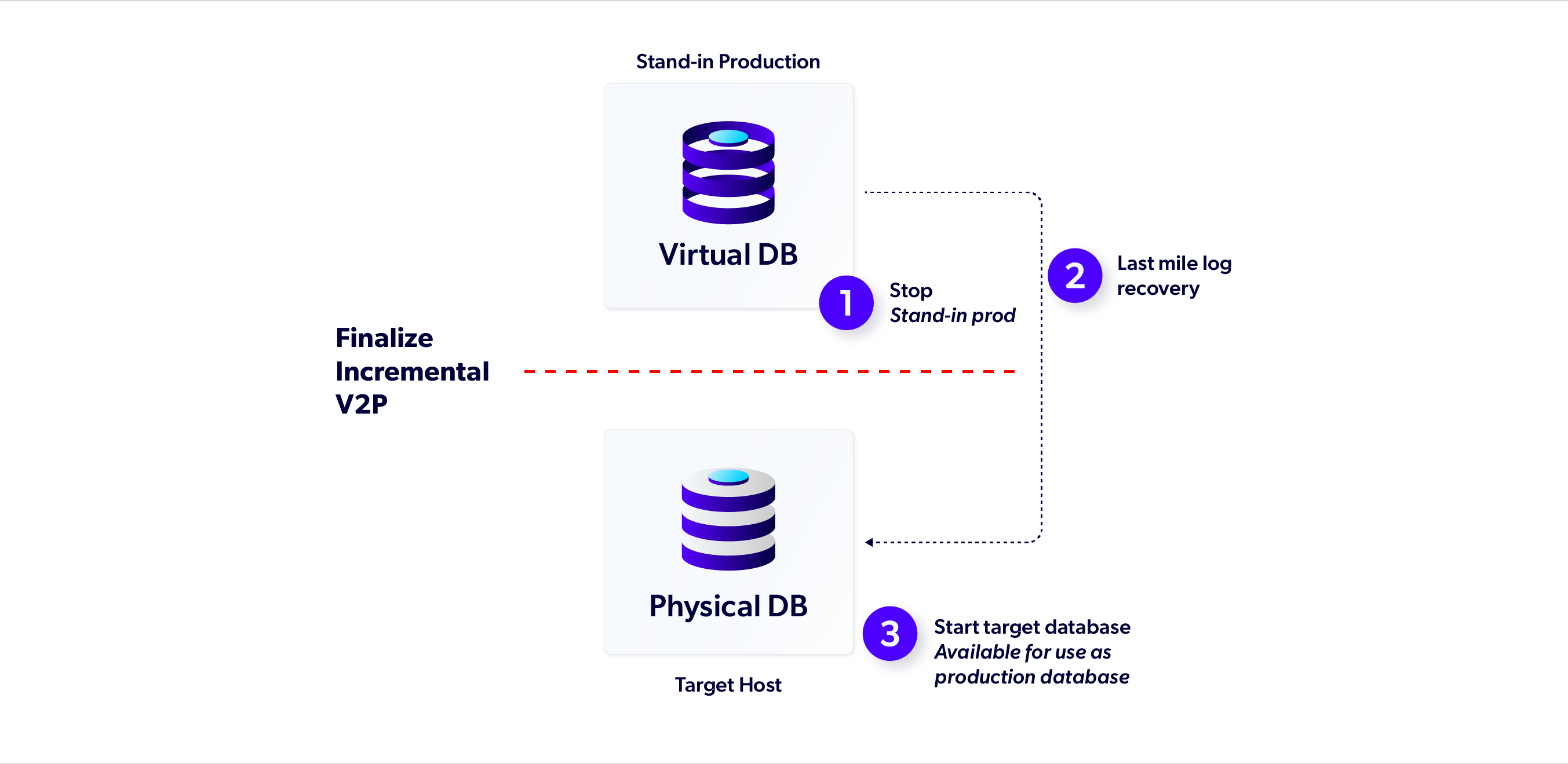
Finalize Incremental V2P operation involves the following sub-steps that Delphix engine performs:
-
Stopping stand-in production virtual database. This causes downtime, so the Finalize Incremental V2P operation should be planned accordingly.
-
Appling any remaining backups to the physical database.
-
Last mile log recovery to recover any data generated after the last backup was taken for the stand-in production database.
-
Bringing up the new physical database in READ WRITE mode. It's now available for use as production database.
Lastly, the temporary virtual database, provisioned on the target host during Incremental V2P operation is deleted from the target host. Refer to Finalize the Incremental V2P operation for an Oracle VDB or a VPDB to know detailed steps to perform Finalize Incremental V2P operation via CLI.
Incremental V2P Best Practices
-
Incremental V2P operation must be initiated from the LATEST timeflow point of a VDB or vPDB. It cannot be initiated against a dSource.
-
Do not upgrade Delphix Engine while the Incremental V2P operation is in progress.
-
Set RMAN Channels, FilesPerSet and SectionSize in
incrementalExportParametersfor the Incremental V2P operation to appropriate values for optimizing performance of the incremental backups. -
For performing Incremental V2P on a virtual pluggable database (vPDB) provisioned in a Linked CDB, the Linked CDB should have Block Change Tracking (BCT) enabled.
-
Consider using
invokeDatapatchif recovering to higher patch version to avoid issues during Finalizing Incremental V2P operation. -
Use source runtime information periodically to check the status of in-progress Incremental V2P operation. It also helps in determining how far apart the source (stand-in production) and new physical databases are. To learn more about runtime attributes refer to the section Monitor Oracle incremental V2P status.
-
Monitor the faults on the source VDB/vPDB container and take corrective actions if faults are persistent.
-
Do not disable/delete or use any force operations on either source or target database while the Incremental V2P operation is in progress.
-
Set the
allowAutoVDBRestartOnHostRebootproperty for the stand-in production VDB to true and do not toggle it while the Incremental V2P operation is in progress. -
To clean up / abort the in-progress Incremental V2P operation in any exceptional situation, use the
exportCleanupAPI.
Feature Limitations
-
The Incremental V2P, Finalize Incremental V2P, and Cleanup V2P operations are available only via API/CLI.
-
V2P to multiple ASM disk groups is not supported.
-
A PDB can be V2P’ed only to a physical CDB target.
-
Incremental V2P is supported for Oracle databases v12.1.0.1 and above.