Installation and setup for Kubernetes
Overview
Data Control Tower can be deployed in a matter of minutes once a Kubernetes cluster has been identified and deployment details have been aligned with your Kubernetes administrator. The installation consists of three components:
-
Kubernetes cluster: The identified infrastructure to which DCT will be deployed.
-
HELM: This deploys DCT as a Kubernetes application by referencing HELM charts (.yaml files) that make up the DCT install, either by an external Helm repository (https://dlpx-helm-dct.s3.amazonaws.com, this is the quickest path to installing DCT, as it largely automated) or via local install (this is accomplished by downloading the Helm charts directly via the DCT .tar file on download.delphix.com).
-
kubectl: Is a command line tool that enables administrative communication with the deployed pods (most useful post-deployment or after an upgrade).
DCT is designed to run and is supported on any Certified Kubernetes platform that supports Helm. See the full statement in the Getting started page.
Before getting started, Delphix recommends engaging your Kubernetes Admin for deployment guidance on available Kubernetes deployment platforms (AKS, EKS, etc.). Configurations like node sizing and persistent volume settings will need to be determined.
Hardware requirements
The hardware requirements for Data Control Tower (DCT) on Kubernetes are listed below. In addition to these requirements, inbound port 443 must be open for API clients, and outbound port 443 to engines. This is the minimum total resource request for the Kubernetes deployment of DCT. Individual service-level resource requests are contained in the values.yaml file and can be overridden during deployment.
If deploying with AI features enabled, additional CPU and memory resources may be required.
-
CPU: 4-Core
-
CPU architecture: x86_64
-
Memory: 16GB
-
Storage: 50GB
-
Port: 443
The recommended minimum 50 GB of storage is shared across the Kubernetes cluster (i.e., hosts). All pods and/or services use this storage for mounted volumes and other utilities, including image storage.
In a single-node cluster, if shared volumes are not externalized, the host requires the full 50 GB of storage. If the persistent volume is mounted externally, the host requires 37 GB of storage. This estimate is based on the default storage required by the database (10 GB), gateway (1 GB), masking (1 GB), and virtualization-app (1 GB). The virtualization-x.0.0 image is no longer included in recent releases.
The default storage configuration for the database, gateway, masking, and virtualization-app can be modified in values.yaml.
Many users may have default container settings as part of their Kubernetes or OpenShift infrastructure management. Compare those defaults with the recommended minimum performance specifications, and update them if lower (engage your container infrastructure team to verify).
For users who need to set limits, you can start with the following sample configuration.
Note: If your installation or air-gapped workflows refer to virtualization-x.0.0 (for example, in docker pull, docker tag, or image mirroring steps), remove it. Only mirror or pull the images provided for your target version. The sample configuration below reflects this change.
dataBookmarks:
  resources:
    requests:
      memory: "256Mi"
      cpu: "100m"
    limits:
      memory: "512Mi"
      cpu: "300m"
dataLibrary:
  resources:
    requests:
      memory: "256Mi"
      cpu: "100m"
    limits:
      memory: "1024Mi"
      cpu: "800m"
database:
  resources:
    requests:
      memory: "256Mi"
      cpu: "200m"
    limits:
      memory: "4096Mi"
      cpu: "1100m"
gateway:
  resources:
    requests:
      memory: "512Mi"
      cpu: "400m"
    limits:
      memory: "2048Mi"
      cpu: "400m"
graphql:
  resources:
    requests:
      memory: "256Mi"
      cpu: "100m"
    limits:
      memory: "1024Mi"
      cpu: "200m"
ui:
  resources:
    requests:
      memory: "128Mi"
      cpu: "100m"
    limits:
      memory: "256Mi"
      cpu: "200m"
jobs:
  resources:
    requests:
      memory: "256Mi"
      cpu: "200m"
    limits:
      memory: "1024Mi"
      cpu: "400m"
jobsCleaner:
  resources:
    requests:
      memory: "256Mi"
      cpu: "200m"
    limits:
      memory: "512Mi"
      cpu: "400m"
masking:
  resources:
    requests:
      memory: "512Mi"
      cpu: "500m"
    limits:
      memory: "2304Mi"
      cpu: "700m"
virtualizationApp:
  resources:
    requests:
      memory: "512Mi"
      cpu: "600m"
    limits:
      memory: "2560Mi"
      cpu: "700m"
Installation requirements
DCT requires a running Kubernetes cluster; This could be an on-premises cluster, Azure AKS or AWS EKS cluster. DCT also requires a kubectl command line tool to interact with Kubernetes cluster and HELM for deployment on to the cluster.
| Requirement | DCT recommended version | Comments |
|---|---|---|
|
Kubernetes Cluster |
1.25 or above |
|
|
HELM |
3.9.0 or above |
Install HELM as the package manager using the HELM installation article. |
|
kubectl |
1.25.0 or above |
HELM will internally refer to the If the To install |
Installing DCT from external HELM repository
Network requirements
The machine on which them helm commands will be executed must be able to connect to https://dlpx-helm-dct.s3.amazonaws.com (TCP on port 443). Otherwise, see the section for Offline mode below.
Process
-
Add the DCT HELM repo with the following, which will link the DCT HELM repo to the local client HELM repo:
Copyhelm repo add dct-services https://dlpx-helm-dct.s3.amazonaws.com -
Update the added repos with the following, which will update the local HELM charts metadata (index.yaml).
Copyhelm repo update -
Pull the HELM charts with the following command, which is used to download the .tgz file.
Copyhelm pull dct-services/delphix-dct --version x.0.0 -
The downloaded file is then extracted using the following command (where x.0.0 should be changed to the version of DCT being installed):
Copytar -xvf delphix-dct-x.0.0.tgz -
Update the following properties in values.yaml which is present in the extracted folder delphix-dct.
-
To generate the bootstrap APIKey, set
apiKeyCreate: true. -
Provide image credentials to pull images from docker registry.
-
username: <retrieved from download.delphix.com> -
password: <retrieved from download.delphix.com>
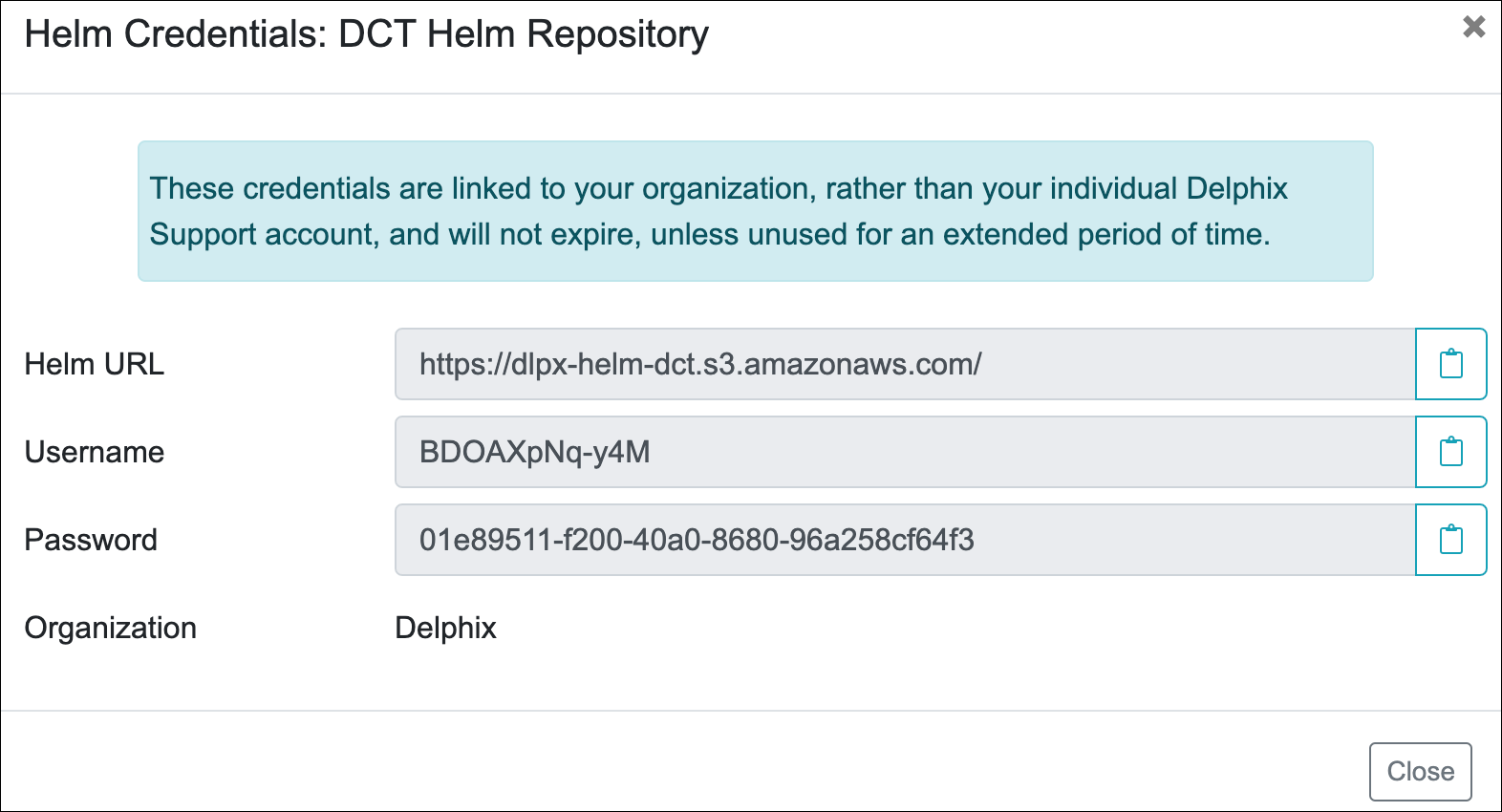
To get the image credentials, visit the Delphix DCT Download page and login with your customer login credentials. Once logged in, select the DCT Helm Repository link and accept the Terms and Conditions. Use password from the popup screen, as shown below.
6. Install the Helm chart:
helm install <deployment-name> delphix-dct7. Check the deployment status:
helm listOffline mode installation
Offline mode is supported for use cases where:
-
The cluster is air-gapped and does not have access to the Delphix Docker registry.
-
Delphix Docker images must be pushed to the organization’s internal Artifactory or registry for scanning or to comply with internal security policies.
If either of these cases applies, retrieve the Delphix Docker images, Helm chart, and deploy using a jump box machine. The jump box must have access to both the Delphix Docker registry (or download site) and the organization’s internal Artifactory or registry, and it must meet the installation requirements.
-
Get the Docker images
There are two ways to retrieve the Delphix Docker images; either pull the images from the Delphix Docker registry or download and load the images from a tarball.
-
Pulling images from the Docker registry
-
Login to the jump box machine.
-
Pull the Docker images from the Delphix Docker registry:
Copydct.download.delphix.com/delphix-dct:app-x.0.0
dct.download.delphix.com/delphix-dct:jobs-x.0.0
dct.download.delphix.com/delphix-dct:nginx-x.0.0
dct.download.delphix.com/delphix-dct:postgres-x.0.0
dct.download.delphix.com/delphix-dct:graphql-x.0.0
dct.download.delphix.com/delphix-dct:ui-x.0.0
dct.download.delphix.com/delphix-dct:virtualization-app-x.0.0
dct.download.delphix.com/delphix-dct:delphix-data-library-x.0.0
dct.download.delphix.com/delphix-dct:data-bookmarks:x.0.0
dct.download.delphix.com/delphix-dct:masking-x.0.0
dct.download.delphix.com/delphix-dct:ai-control-x.0.0
dct.download.delphix.com/delphix-dct:ai-execution:x.0.0 -
Re-tag all Docker images. The example below shows the re-tag command for one image:
Copy$ docker tag dct.download.delphix.com/delphix-dct:nginx-x.0.0 <local registry url>:nginx-x.0.0Re-tag all remaining DCT images using the same format.
-
Push the re-tagged images into the internal registry. The example below shows the push command for one image:
Copy$ docker push <local registry url>:nginx-x.0.0
-
-
Downloading tarball images
-
If you do not have direct access to the Delphix Helm and Docker repositories, download the Helm chart and Docker image packages (delphix-dct-x.0.0.tar.gz) from the download site.
-
Log in to the jump box machine.
-
Download the delphix-dct-x.0.0.tar.gz file, then extract it to obtain the Helm chart and Docker images.
-
Load the extracted Docker images using the following command:
Copyfor image in *tar; do sudo docker load --input $image; done -
Re-tag all Docker images. The example below shows the re-tag command for one image:
Copy$ docker tag registry.delphix.com/delphix-dct:nginx-x.0.0 <local registry url>:nginx-x.0.0Re-tag all remaining DCT images using the same format.
-
Push the re-tagged images into the internal registry. The example below shows the push command for one image:
Copy$ docker push <local registry url>:nginx-x.0.0
-
-
-
Deploy
Update the values.yaml file with your internal registry details and image credentials:
CopyRegistry: <local registry url>
Username: <local registry username>
Password: <local registry password>
Deployment status
Once deployment is complete, check the status of the deployment using the following command (where X.0.0 should be changed to the version of DCT being installed):
helm list
NAME              NAMESPACE    REVISION    UPDATED                                 STATUS      CHART                    APP VERSION
dct-services      default      1           2023-01-10 19:33:41.713202 -0900        deployed    delphix-dct-x.0.0        x.0.0
Assuming an ingress controller configuration on the Kubernetes cluster is present, when accessing DCT after the deployment, the ingress controller rule needs to be added for proxy service, along with port 443 (if SSL is enabled) and port 80 (if SSL is disabled).
Upgrading in place (in Kubernetes)
DCT supports in-place upgrades on Kubernetes with Helm.
-
Create a new values.yaml for your target version, copying over only the settings you previously changed.
-
If you use a private registry, update your credentials in values.yaml.
-
Run:
helm upgrade -f values.yaml dct-services delphix-dctOn first startup after the upgrade, DCT services apply any required migrations automatically. For details on new services, storage requirements, or licensing behavior, see the Deployment upgrade for Kubernetes page.