Create a linked service for Azure Database for PostgreSQL
Learn how to configure an Azure Data Factory (ADF) linked service for Azure Database for PostgreSQL – Flexible Server using a parameterized database name. Parameterizing the database name enables reuse of the same linked service and pipelines across environments by supplying the database name at runtime.
This task applies to the following scenarios:
- ADF or Azure Synapse pipelines that connect to Azure Database for PostgreSQL – Flexible Server
- Linked service configuration only
- Parameterization of the
LS_DATABASEvalue (database name)
- An Azure Data Factory workspace with permission to create linked services
- An existing Azure Database for PostgreSQL – Flexible Server
- Network and firewall access from the Integration Runtime (IR) to the PostgreSQL server
- A PostgreSQL username and password with access to the target database or databases
- Log in to Azure Data Factory.
- Select the correct subscription and data factory.
- Click the Manage (toolbox) icon on the left and select Linked services.
- Click New linked service.
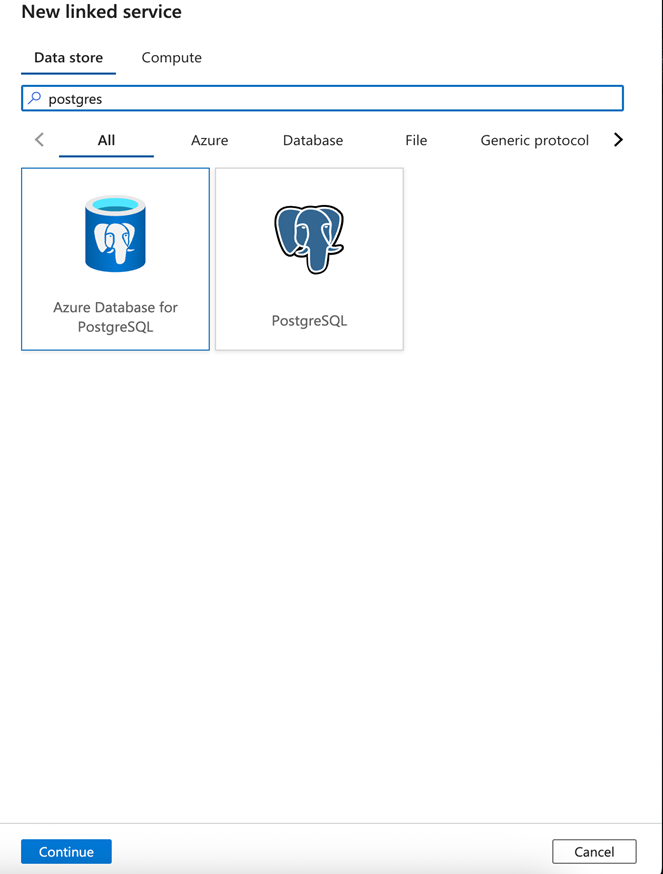
- In the Data store search box, type PostgreSQL.
-
Select Azure Database for PostgreSQL from the list, then Continue.
- Configure the linked service:
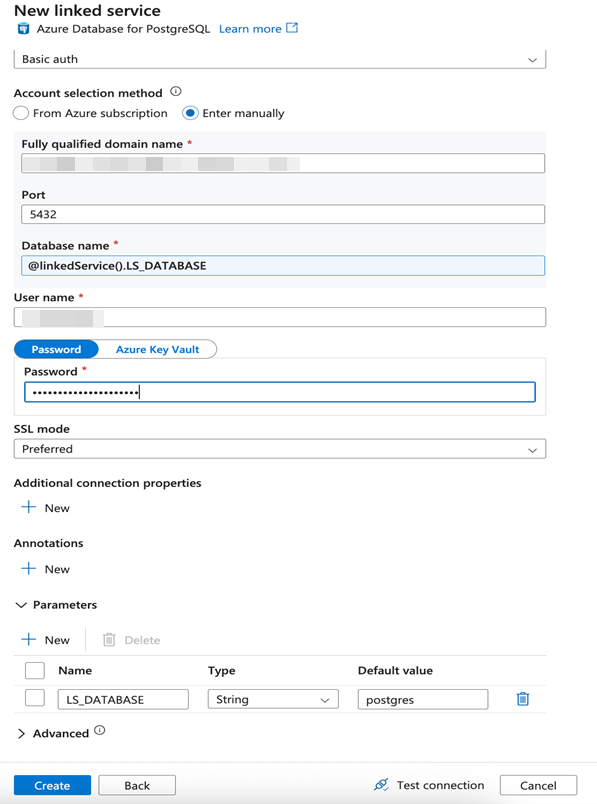
- Parameters: Add a string parameter with or without a default value. For example:
LS_DATABASE - Name: Enter a meaningful name to identify the linked service. Optionally, add a description.
- Connect via integration runtime: Select the appropriate integration runtime, for example, AutoResolveIntegrationRuntPime.
- Account selection method: SelPostgresect Enter Manually.
- Fully qualified domain name: Enter the complete address of your PostgreSQL server, for example, <your-server-name>.database.windows.net.
- Database name: Enter the name of the specific database on the PostgreSQL server that your pipeline will connect to. For parameterization, use a dynamic expression such as @dataset().DatabaseName or @linkedService().LS_DATABASE, depending on your setup.
- Authentication type: Select the authentication method based on your environment standards (for example, SQL Authentication, Managed Identity).
- Define the credentials:
- Provide the username and password.
- Store the password directly in the linked service or use Azure Key Vault for security.
- Parameters: Add a string parameter with or without a default value. For example:
LS_DATABASE - To ensure the linked service is set up correctly, click Test connection. If the test is successful, to save the linked service, click Create.
Your parameterized PostgreSQL Database linked service is now configured and ready to use in Azure Data Factory.