Java Development Kit (JDK)
Action required: The Continuous Data UI, API, and CLI are scheduled for end of life. Review the latest migration guidance and start planning your transition to Data Control Tower.
On new engine installations of 2026.5.0.0 and later, the Admin UI opens directly to the Performance Dashboard, and the Manage, Resources, and System menus are unavailable. Engines upgraded from an earlier version keep full Admin UI access. This restriction cannot be changed by customers; contact Delphix Support if you need it lifted temporarily.
Learn more about the Continuous Data end-of-life announcement.
Overview
The Java Development Kit (JDK) is required on each environment to run the Delphix Toolkit. The JDK is provided by default with the Delphix Connector. Delphix Continuous Data Engine uses Eclipse Adoptium (formerly known as AdoptOpenJDK).
Users can provide their own Java when adding an environment and in the environment configuration page. This includes Oracle JDKs, Adoptium Temurin JDKs.If you want to use a more recent version than the one that comes with Delphix Continuous Data Engine, you can do so when adding an environment to a given Delphix Continuous Data Engine.
Note that the JDK is provided per node or host, not per cluster or environment. Initially, when creating a cluster all hosts must have Java at the same absolute path. However, once the cluster has been discovered in Delphix Continuous Data Engine each host's path can be adjusted. Supported JDKs include Adoptium Temurin OpenJDK and Oracle. If you have a Java license with Oracle then you can follow the instructions in this section.
-
All Delphix environment users on that environment require read and execute permissions on the provided JDK, its subfolders, and files.
-
Delphix only supports using custom JDKs for Oracle and Adoptium Temurin. All other JDKs are not supported.
Adding a JDK
By default, Delphix Continuous Data Engine comes with Adoptium’s OpenJDK for toolkits. To modify the JDK, follow the below steps:
-
Log in to the Delphix management application.
-
Click Manage.
-
Select Environments.
-
Click the Actions (...) menu next to Environments and select Add environment.
-
In the Environment settings tab, select the Provide my own JDK checkbox, and click Next.
This action will remove the previous built-in JDK and will initiate an Environment refresh operation after the path is changed.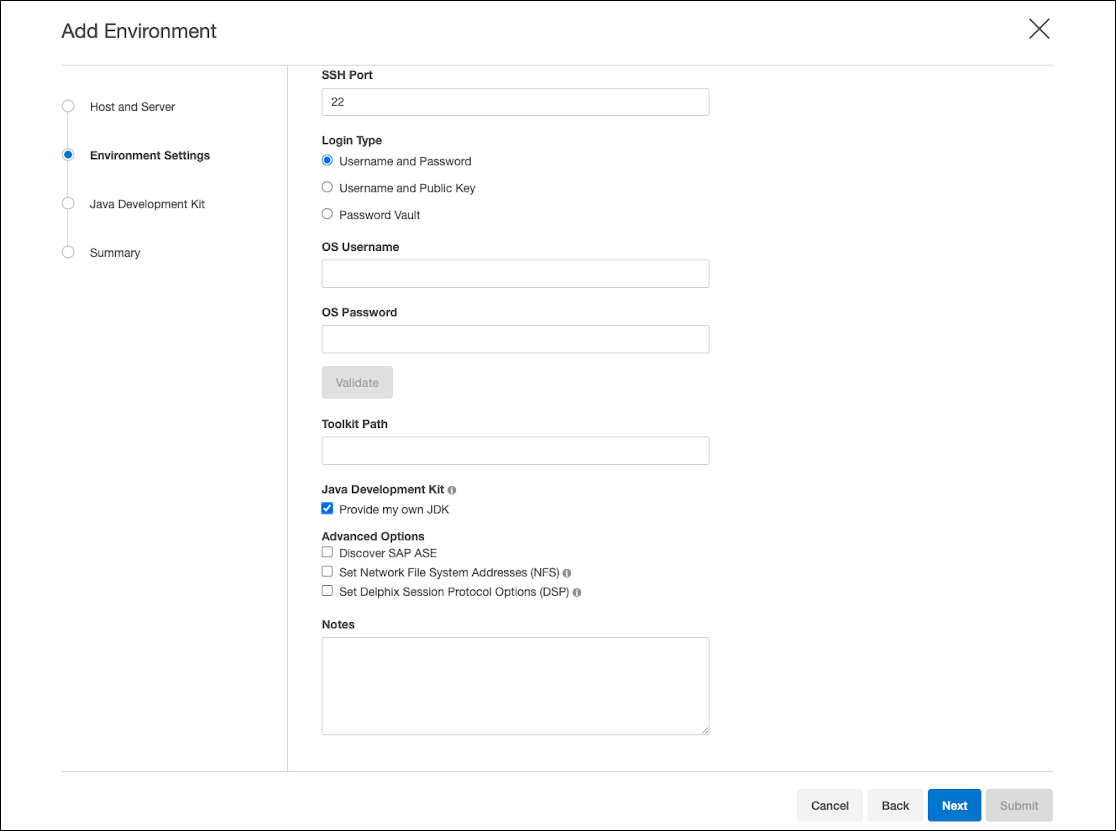 Select Reset to Default to reset your JDK to the OpenJDK default.
 -
In the Java development kit tab, the currently selected JDK kit will be shown (default is OpenJDK). Provide an absolute path to the JDK root and click Next.
-
Starting from release 2026.2.0.0, Delphix Continuous Data Engine uses JDK17 and provide custom JDK 17 path.
-
Verify the configured JDK and environment settings and click Submit.
Updating a JDK path
For existing environments, you can add or update JDK paths by following the steps below:
-
Log in to the Delphix management application.
-
Select Manage > Environments.
-
Click on the name of an environment to view its basic information.
-
In the Details tab next to the Java development kit, click the Pencil icon.
-
In the Java development kit dialog, provide an absolute path to the JDK root and click Next.
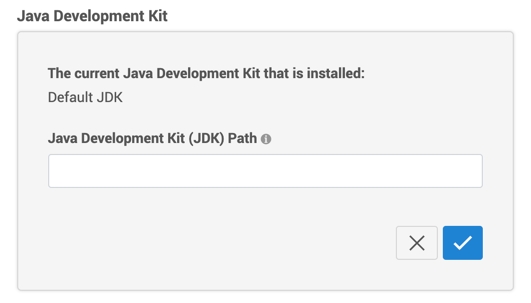 Any custom jdk used before 2026.2.0.0 will be removed and environments will be using default jdk17 provided by the engine post upgrade. This jdk can be updated here.Do not place the JDK inside the Delphix Toolkit.
 -
Click the Check icon to save your changes.
Finding a JDK
Custom JDKs need to be present on an environment which is being added to Delphix Continuous Data Engine and can be sourced directly from the supported vendors. These JDKs must be of Java major version 17 and come from one of the following:
-
Oracle
-
Adoptium Temurin OpenJDK
Supported operating systems
This feature is supported for Linux and Windows environments and for AIX environments that use one of the JDK 17 versions shown in the support matrix.
|
|
RHEL |
SLES |
AIX |
Windows |
|---|---|---|---|---|
|
|
Y |
Y |
Y |
Y |
AdoptOpenJDK 17.0.17_10
|
Y | Y | Y | Y |
-
With Continuous Data Engine version 2026.2.0.0 and above.
For AIX host resource limits required by JDK 17, see AIX resource limit requirements for JDK 17.
Delphix toolkit native Java support matrix
The below matrix describes the supported versions of Java we package with the Delphix toolkit for each operating system. This is the default option if you do not use the feature to provide your own Java for each host.
|
RHEL |
SLES |
AIX |
Windows |
|
|---|---|---|---|---|
| OpenJDK17U 17.0.17_10 | Y | Y | Y | Y |
Java support policy
Delphix Continuous Data Engine is committed to testing and certifying the JDK versions that are included with the product, along with specific versions provided by Oracle. While using custom JDKs from Adoptium Temurin is generally supported, there is no certification process beyond those detailed in the native Java support matrix above Providing Your Own Oracle Java.