Delete objects to increase capacity
Action required: The Continuous Data UI, API, and CLI are scheduled for end of life. Review the latest migration guidance and start planning your transition to Data Control Tower.
On new engine installations of 2026.5.0.0 and later, the Admin UI opens directly to the Performance Dashboard, and the Manage, Resources, and System menus are unavailable. Engines upgraded from an earlier version keep full Admin UI access. This restriction cannot be changed by customers; contact Delphix Support if you need it lifted temporarily.
Learn more about the Continuous Data end-of-life announcement.
This topic describes how to delete database objects to create additional capacity.
Regularly deleting unused or outdated objects is a standard practice in Delphix Continuous Data Engine administration. This practice is especially important to prevent low space errors, which can cause the Delphix Continuous Data Engine to stop. The Delphix Continuous Data Engine holds a maximum of 750 objects. Perform the following steps to delete the objects:
-
Log into the Delphix Management application.
-
Select Resources > Storage Capacity.
-
Next to the object you want to delete, select the Trashcan.
-
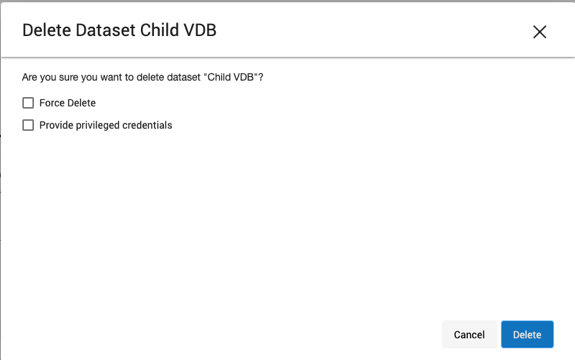
In the Delete dialog, select Force Delete. Oracle users will have the option to provide additional credentials.
-
Click Delete.
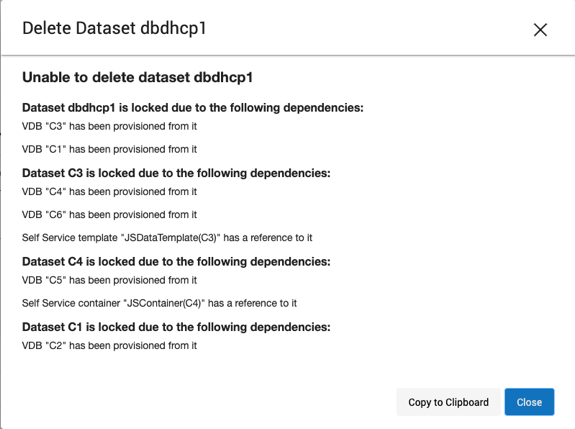
DependenciesIf there are dependencies on the snapshot, you will not be able to delete the snapshot-free space; the dependencies rely on the data associated with the snapshot. These items are displayed with a lock icon next to the name.