Repave block storage engines
Use this page for planned repave when the source engine is healthy and reachable. If you need to restore from captured metadata snapshots after a failure, use Repave for disaster recovery instead.
Prerequisites
-
Repave is supported on Continuous Data (virtualization) engine with block storage as of version 13.0.0.0 and Continuous Compliance (masking) engine with block storage as of version 16.0.0.0.
-
The target engine shall be in the same version and platform type as the source engine.
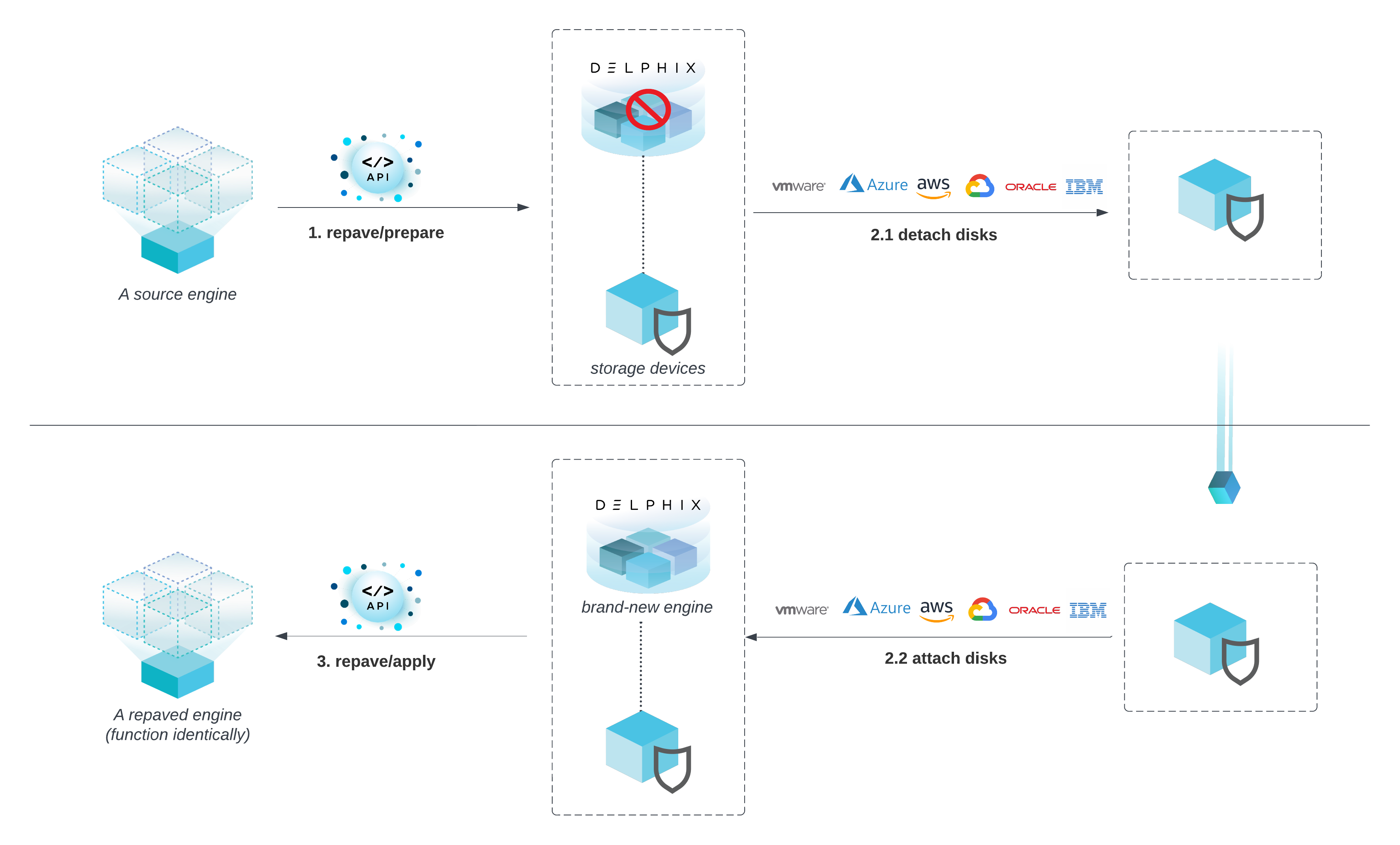
Repave a Delphix engine
-
A sysadmin initiates repave/prepare on the source engine. All Delphix datasets are disabled and the Delphix management service is shut down.
-
A sysadmin detaches storage devices from the Delphix engine and attaches them to a new Delphix engine. This can be done through cloud APIs or manual operation. Do not complete the first-time setup wizard on the new engine before calling
repave/apply. Completing first-time setup on a new engine that has the original storage devices attached will overwrite the storage pool and cause data loss. -
A sysadmin calls repave/apply on the new engine. All previously disabled data sources are enabled again.
Repave API calls
-
POST repave/prepareinitiates the repave preparation on the source engine -
POST repave/applystarts the process of applying repave on the target engine. -
GET repavereturns the repave state, configurable metadata, and engine summary of the current engine. -
POST repave/previewon the target engine allows you to preview the summary and metadata of a source engine that you apply to the target engine. You must runPOST repave/previewon the target engine before you executePOST repave/applyto determine if the target engine is eligible for thePOST repave/applyoperation.
The representation below is a general API workflow of repave.
Establish Session, Login before calling repave APIs.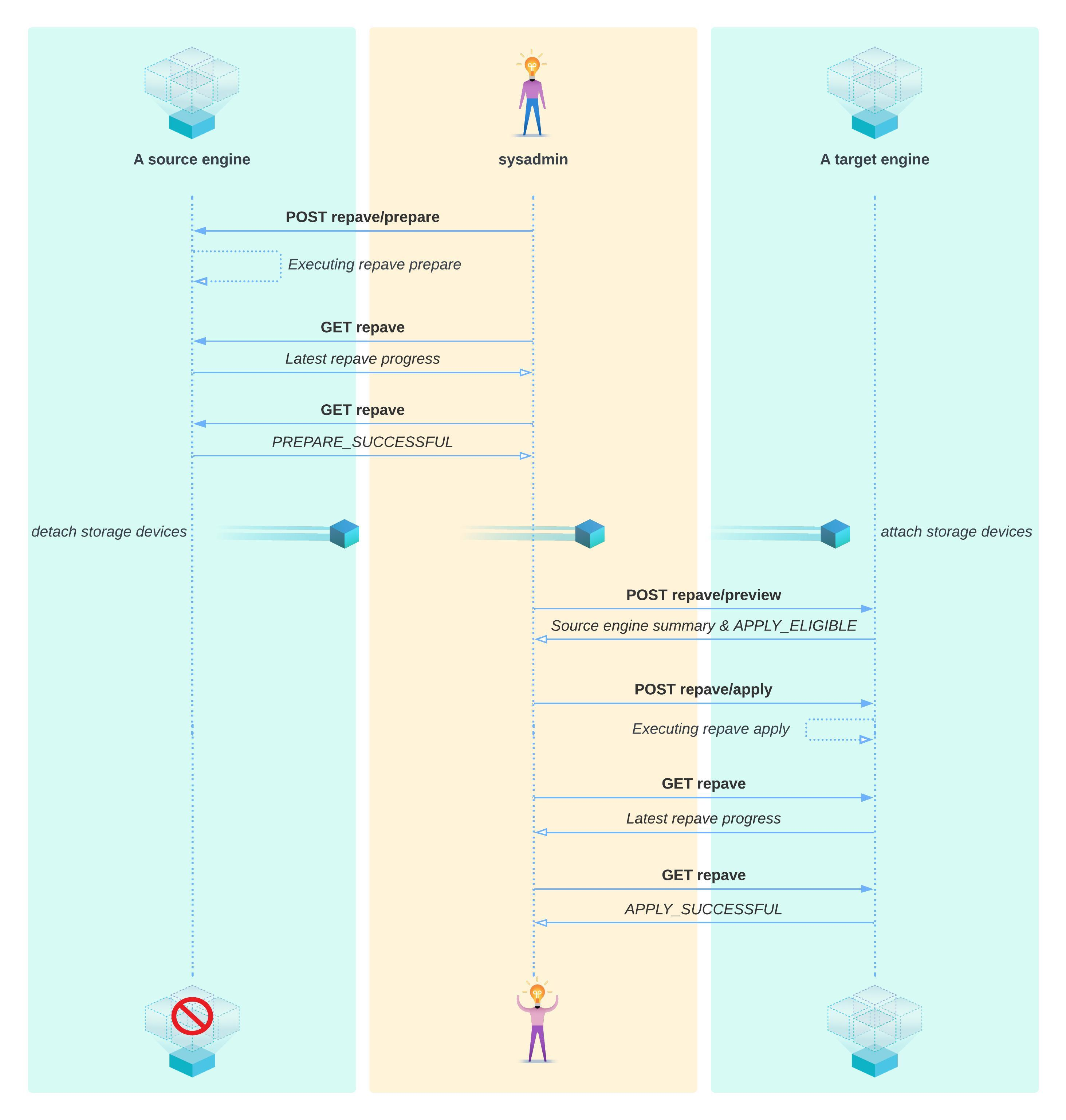
Tips and usage guidelines
-
repave/prepareandrepave/applyreturns a job id. However, when the Delphix management service is down, the job API will not work. The other way to check the repave status is by callingGET repave. -
All running sources on the engine will be disabled by repave. However, if an environment was disabled before repave, repave might fail to enable the corresponding dSources and vDBs back. Manually enabling the environment and then enabling the dSources and vDBs should resolve the problem.
-
If an engine gets stuck in an ongoing repave state for a very long time (like a few hours), restarting the Delphix management stack can forcibly reset repave to a failed state so users are able to try again.
-
If the source engine has a hot fix installed, the target engine shall have the same hotfix installed as well before applying repave.
POST calls
Establish session
http://{{delphix_engine_url}}/resources/json/delphix/session
Establish an API session with Delphix, which is required before calling repave APIs.
{
    "type": "APISession",
    "version": {
        "type": "APIVersion",
        "major": {{api_version_major}},
        "minor": {{api_version_minor}},
        "micro": {{api_version_micro}}
    }
}
Login
http://{{delphix_engine_url}}/resources/json/delphix/login
Log in as sysadmin, which is required before calling repave APIs.
{
   "type": "LoginRequest",
   "username": "{{sysadmin_user}}",
   "password": "{{sysadmin_pwd}}"}
Repave prepare
http://{{delphix_engine_url}}/resources/json/delphix/repave/prepare
Introduction
Delphix sysadmin calls repave/prepare to start preparing for repave on the source engine compromised.
-
All the sources will be disabled.
-
All datasets and required metadata will be transferred to domain storage devices.
-
The Delphix management service will be shut down.
Request parameters
-
ignoreDisableSourcesFailures
Iftrue, a failure to disable sources will not block the repave. The default isfalse, if not provided. -
enableSourcesOnFailure
Iftrue, when repave fails, data source disabled by repave will be enabled again. The default isfalse, if not provided.
Response
A job id and action id will be returned if the API is called successfully.
PREPARE_SUCCESSFUL before detaching dataset storage devices.Technical details
The Delphix engine will go through four main steps during this phase:
-
Quiesce engine
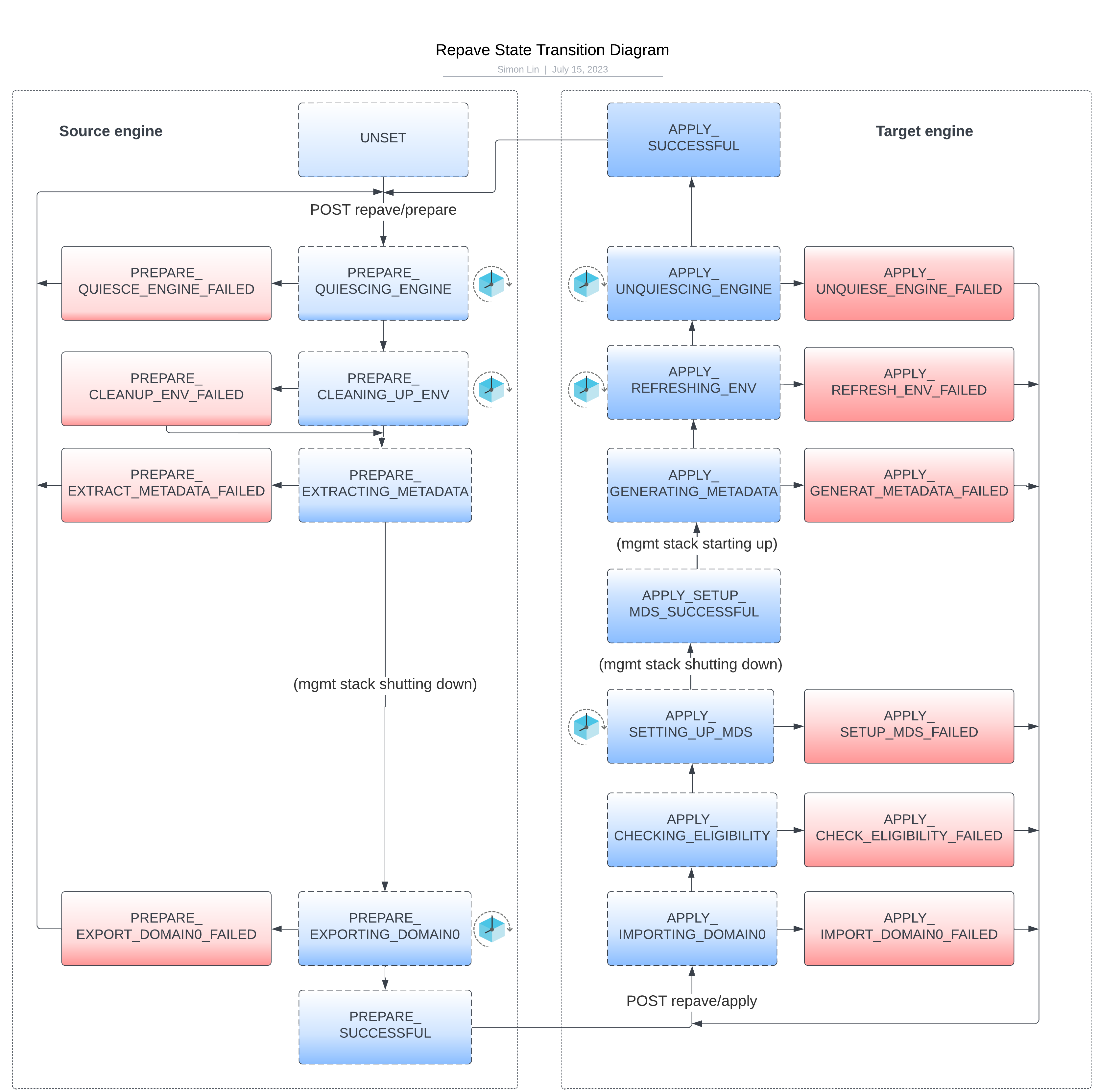
All domain users will be forcibly kicked out. All automatic replication will be turned off. All running jobs will be cancelled or suspended. All policies will be paused. All sources will be disabled. A Repave statePREPARE_QUIESCE_ENGINE_FAILEDindicates that the engine is failed to quiesce the engine. -
Clean up environments
Windows environments will be cleaned up, this step is mainly to clean up the iSCSI setting of environment hosts. Any failure will be ignored since this step does not block repave, but users might see legacy iSCSI settings on their Windows environment hosts. -
Extract metadata
Metadata that presents the identity of the current engine will be extracted and stored in the dataset storage pool. A Repave statePREPARE_EXTRACT_METADATA_FAILEDindicates that the engine has failed to extract metadata. -
Export dataset storage pool
Services like Delphix management stack and Postgres will be stopped before exporting the dataset storage pool. The repave statePREPARE_EXPORT_DOMAIN0_FAILED(state name uses "DOMAIN0" for backward compatibility) indicates that the current engine has failed to stop services or export the dataset storage pool.
{
    "type": "RepavePrepareParameters",
    "ignoreDisableSourcesFailures":false,
    "enableSourcesOnFailure":false
}
Repave apply
http://{{delphix_engine_url}}/resources/json/delphix/repave/apply
Introduction
Delphix sysadmin calls repave/apply on the new engine. The Delphix management service will be restarted and all previously disabled data sources will be enabled again.
repave/apply on the target engine, complete this checklist in order.-
Create the new target VM from a supported Delphix image (OVA, marketplace image, or download image).
-
Attach the original dataset storage devices from the source engine to the new target VM.
-
Do not complete the first-time setup wizard on the target engine before repave apply.
-
Log in as
sysadmin, establish API session and login if using REST APIs, set required apply parameters, and then commitrepave/apply.
-
Before calling this API, make sure all dataset storage devices have been attached to the target engine correctly.
Request parameters
One type of parameter is supported for version 13.0.
-
BlockStorageRepaveApplyParametersis for Delphix Continuous Data engines with block storage.
Response
A job id and action id will be returned if the API is called successfully.
Technical Details
The engine will go through six main steps during the this phase. APPLY_SUCCESSFUL indicates the engine has applied repave successfully. You can always call repave/apply again if there is any failure during repaving.
-
Import dataset storage pool
The dataset storage pool from the source engine will be imported to the target engine.APPLY_IMPORT_DOMAIN0_FAILED(state name uses "DOMAIN0" for backward compatibility) indicates the repave apply failed to import the dataset storage pool. Delphix management stack will be stopped after this step. -
Check eligibility
Check if the target engine is eligible to apply repave. If the target engine version is different from the source engine, or any required hotfix is not installed, or not enough space is available in the root filesystem, checking eligibility will fail. -
Setup engine metadata
Repave will shut down the Delphix management stack and call a backend task to set up engine metadata (MetaData Service) in this step, the engine metadata was originally from the source engine. It will also rsync/var/delphix, snapshot-based metadata and system tunable from the dataset storage pool to the root filesystem.APPLY_SETUP_MDS_FAILEDindicates repave fails in setting up engine metadata. The Delphix management stack will be restarted after this step. -
Generate metadata
The configurable metadata stored in the dataset storage pool will be generated on the target engine so the target engine will behave identically as the source engine.APPLY_GENERATE_METADATA_FAILEDindicates repave fails to generate metadata. -
Refresh environments
All environments will be refreshed in parallel during this step. New iSCSI settings will be set up again on Windows environment hosts.APPLY_REFRESH_ENV_FAILEDindicates repave fails to refresh environments. -
Unquiesce engine
In this step, all sources disabled by repave will be enabled again, all scheduled replication jobs will be resumed and policy execution will be resumed.APPLY_UNQUIESCE_ENGINE_FAILEDindicates repave fails to unquiesce engine.
{
    "type": "BlockStorageRepaveApplyParameters"}
Repave status
http://{{delphix_engine_url}}/resources/json/delphix/repave
Introduction
GET /repave will show:
-
Latest state of Repave.
-
Summary of the current engine.
-
Metadata of the current engine that will be migrated to the target engine.
Tips
-
Always use
GET /repaveto check repave progress. -
When the Delphix management service is restarting,
GET /repavemight not respond, wait for a few minutes and try again. -
Use the repave state transition diagram below for reference.
Repave preview
http://{{delphix_engine_url}}/resources/json/delphix/repave/preview
Introduction
-
POST repave/previewon the target engine allows you to preview the summary and metadata of a source engine that you apply to the target engine. You must runPOST repave/previewon the target engine before you executePOST repave/applyto determine if the target engine is eligible for thePOST repave/applyoperation. -
The
APPLY_ELIGIBLEstate indicates the current engine is eligible to apply repave. -
The
APPLY_CHECK_ELIGIBILITY_FAILEDstate indicates the current engine is not eligible to apply repave, the actual reason can be found fromstateDetail.
Request parameters
One type of parameter is supported for version 13.0.
-
BlockStorageRepavePreviewParametersis for engines with block storage.
Response
The engine summary and metadata of the source engine.
Technical details
The engine summary and metadata of the source engine are stored in the dataset storage pool. POST repave/preview will try to import the dataset storage pool before previewing them, then the dataset storage pool will be exported again.
{
    "type": "BlockStorageRepavePreviewParameters"}