Managing plugins using the API client
The Continuous Compliance Engine's web API includes a plugin endpoint for managing plugins: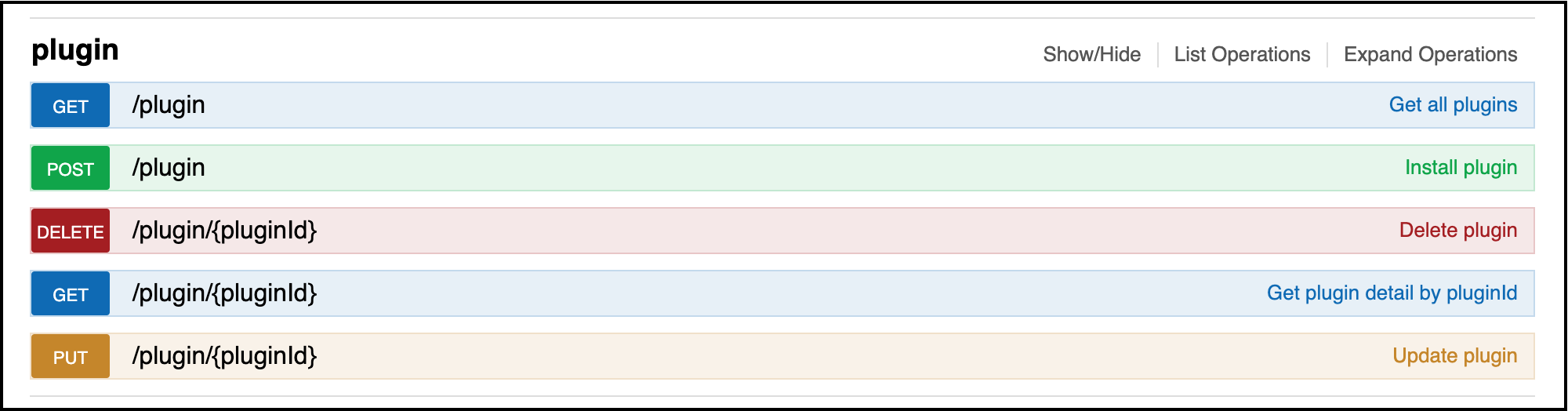
Displaying information about installed plugins
The GET endpoints are useful for getting information about plugins. After following the steps in this section to install the plugin, the GET operation will allow you to retrieve information about the installed plugins. To know what response and information to expect, please see the respective documentation for driver supports and algorithms.
Other plugin endpoint operations
In addition, to GET, the plugin endpoint supports the other CRUD operations:
-
POST - install a new plugin
-
PUT - update an existing plugin
-
DELETE - remove a plugin from the system
The POST and PUT operations both require a fileReference value representing the plugin file to be installed or updated. These values are the result of using the fileUpload endpoint to upload the plugin JAR file to the Masking Engine.
In order to install a new version of this plugin, one could use the PUT operation, or, assuming the algorithm or driver support plugin are not in use, simply DELETE the plugin and POST a new version (or install using the SDK maskScript). Both PUT and DELETE operations require the pluginId value listed for each plugin using the GET operation. Refer to this section for details to help the plugin author ensure that new versions of a plugin can successfully install over an existing version using the PUT operation.
Exporting plugin and JDBC driver JAR files
You can export the original JAR file for a customer-installed plugin or an uploaded JDBC driver by using a two-step API flow.
Step 1: Request an export token
-
POST /plugin/{pluginId}/exportexports the original JAR for an installed, non-built-in plugin. -
POST /jdbc-drivers/{jdbcDriverId}/exportexports the original JAR for an uploaded, non-built-in JDBC driver.
These endpoints return a fileDownloadId that is used in the next step.
Step 2: Download the JAR bytes
-
GET /file-downloads/{fileDownloadId}streams the exported JAR asapplication/octet-stream.
Only customer-installed plugins and uploaded JDBC drivers are exportable. Delphix built-in plugins and built-in JDBC drivers cannot be exported.
For JDBC drivers, export includes only the driver JAR. It does not include any associated driver-support plugin JAR.
Authorization is enforced for both export initiation and file download. The caller must have the Export permission on the corresponding object.